
AZ-104 · Question #759
Note: This question is part of a series of questions that present the same scenario. Each question in the series contains a unique solution that might meet the stated goals. Some question sets might…
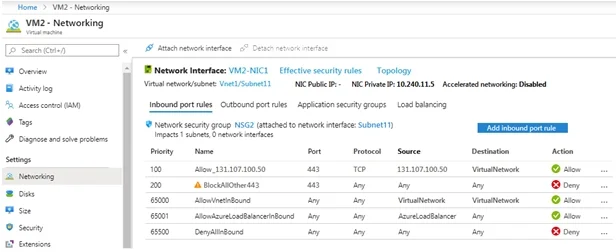
The correct answer is A. Yes. The Azure Network Security Group (NSG) configured on VM2 is preventing the connections from 131.107.100.50 on TCP port 443.
Question
Exhibits
Options
- AYes
- BNo
How the community answered
(15 responses)- A60% (9)
- B40% (6)
Why each option
The Azure Network Security Group (NSG) configured on VM2 is preventing the connections from 131.107.100.50 on TCP port 443.
Based on the effective network security configurations for VM2 (as would be shown in the exhibit), a Network Security Group (NSG) rule is configured with a higher priority to explicitly deny or implicitly block (due to lack of an allow rule) inbound traffic from 131.107.100.50 on TCP port 443 to VM2, causing the connection failure.
If the NSG was not preventing the connection, then either the Load Balancer or the application itself would be the cause of the failure, contradicting the observed connection issues when examining NSG rules.
Concept tested: Azure NSG rule evaluation
Source: https://learn.microsoft.com/en-us/azure/virtual-network/network-security-groups-overview#how-nsgs-filter-network-traffic
Community Discussion
No community discussion yet for this question.