
AZ-104 · Question #712
Hotspot Question You have a Microsoft Entra tenant that contains the groups shown in the following table. The tenant contains the users shown in the following table. Which users and groups can you…
The correct answer is Group1 = Yes; Group2 = Yes; Group3 = Yes; Group4 = Yes. All users can be deleted in Microsoft Entra ID regardless of license assignments or group memberships, but only groups that do not have licenses directly assigned to them via group-based licensing can be deleted.
Question
Exhibits
Answer Area
- Group1Yes
- Group2Yes
- Group3Yes
- Group4Yes
Explanation
All users can be deleted in Microsoft Entra ID regardless of license assignments or group memberships, but only groups that do not have licenses directly assigned to them via group-based licensing can be deleted.
Approach. To determine which users and groups can be deleted, we must consider the rules governing object deletion in Microsoft Entra ID.
For Users:
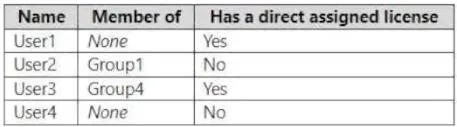
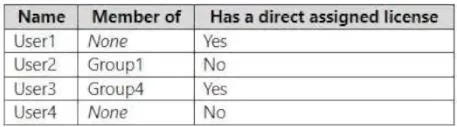
User1: Has a direct assigned license (Yes), not a member of any group (None). Users with direct licenses can be deleted; the license will be unassigned upon deletion.User2: Has no direct assigned license (No), is a member ofGroup1. Users who are members of groups can be deleted; their membership will be removed upon deletion.User3: Has a direct assigned license (Yes), is a member ofGroup4. Same as User1 and User2, can be deleted.User4: Has no direct assigned license (No), not a member of any group (None). Can be deleted. In Microsoft Entra ID, users can generally be deleted regardless of their license assignments or group memberships. Any associated licenses are released, and memberships are automatically removed. Therefore, all users (User1, User2, User3, and User4) can be deleted.
For Groups:
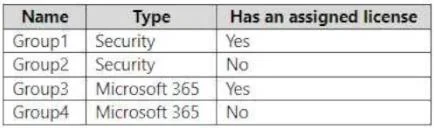
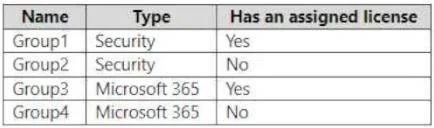
Group1: Type 'Security', Has an assigned license (Yes). If a group has an assigned license, it implies group-based licensing is in use. Such groups cannot be deleted until the licenses assigned to the group are first removed. Therefore,Group1cannot be deleted directly.Group2: Type 'Security', Has an assigned license (No). This group has no licensing dependencies and can be deleted.Group3: Type 'Microsoft 365', Has an assigned license (Yes). Similar toGroup1, this group has an assigned license and cannot be deleted until the license is removed. Therefore,Group3cannot be deleted directly.Group4: Type 'Microsoft 365', Has an assigned license (No). This group has no licensing dependencies and can be deleted. Therefore, onlyGroup2andGroup4can be deleted.
Correct Selections:
- Users dropdown: 'User1, User2, User3, and User4'
- Groups dropdown: 'Group2 and Group4 only'
Common mistakes.
- common_mistake. Common mistakes include believing that users with assigned licenses or users who are members of groups cannot be deleted, or that the type of group (Security vs. Microsoft 365) is the primary factor preventing deletion. In reality, users can always be deleted, and their licenses are automatically unassigned, and memberships are removed. For groups, the critical factor preventing direct deletion is the presence of an 'assigned license,' which indicates group-based licensing. Groups with assigned licenses must have those licenses removed before the group can be deleted. Therefore, selecting any option for users that excludes one or more users, or selecting groups like 'Group1' or 'Group3' (which have assigned licenses) for deletion, would be incorrect.
Concept tested. Microsoft Entra ID (formerly Azure AD) object lifecycle management, specifically the rules and restrictions for deleting user and group objects, with a focus on how direct license assignments to users and group-based license assignments to groups impact the deletion process.
Reference. https://learn.microsoft.com/en-us/entra/identity/users/licensing-groups-delete-group
Topics
Community Discussion
No community discussion yet for this question.