
AZ-104 · Question #668
Hotspot Question You have an Azure subscription that contains a storage account named storage1. You need to configure a shared access signature (SAS) to ensure that users can only download blobs…
The correct answer is Allowed services: Blob; Allowed resource types: Object; Allowed permissions: Read. To allow users to only download specific blobs by name, the Shared Access Signature (SAS) must be configured with 'Read' permission for the 'Object' resource type.
Question
Exhibit
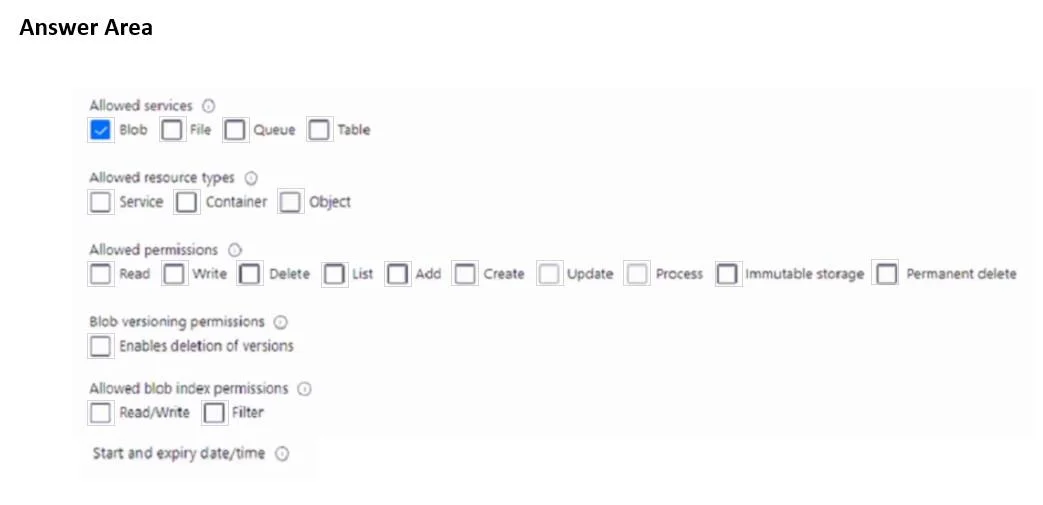
Answer Area
- Allowed servicesBlobBlobFileQueueTable
- Allowed resource typesObjectServiceContainerObject
- Allowed permissionsReadReadWriteDeleteListAddCreateUpdateProcessImmutable storagePermanent delete
Explanation
To allow users to only download specific blobs by name, the Shared Access Signature (SAS) must be configured with 'Read' permission for the 'Object' resource type.
Approach. The question asks to configure a SAS so that users can only download blobs securely by name. This implies two key aspects: the action they can perform and the scope of that action.
- Allowed permissions: Read: The phrase 'download blobs' directly translates to requiring 'Read' permission. This allows users to read the content of the blobs.
- Allowed resource types: Object: The phrase 'securely by name' indicates that access should be limited to individual blobs, not entire containers or the service itself. An individual blob is considered an 'Object' within Azure Storage's resource hierarchy for SAS configuration. Selecting 'Object' ensures that the SAS token grants permissions only to a specific blob (or blobs specified in the SAS URL, if generated for multiple objects) rather than a container (which would allow listing or accessing all blobs within it) or the entire service.
Therefore, to meet the requirements, the user must select the 'Read' checkbox under 'Allowed permissions' and the 'Object' checkbox under 'Allowed resource types'.
Common mistakes.
- common_mistake. Common mistakes include selecting incorrect permissions or resource types:
- Selecting 'Container' for 'Allowed resource types': This is incorrect because 'Container' grants permissions at the container level, potentially allowing operations like listing all blobs within a container, which is broader than 'downloading blobs securely by name' (a specific blob). The requirement 'by name' points to individual object access.
- Selecting 'List' for 'Allowed permissions': While 'List' allows enumerating blobs within a container, it does not grant permission to download the content of a specific blob. 'Download' requires 'Read' permission.
- Selecting 'Service' for 'Allowed resource types': This grants permissions at the storage account level, which is far too broad and insecure for the stated requirement of downloading specific blobs by name.
- Selecting additional permissions like 'Write', 'Delete', 'Add', etc.: These are incorrect as the requirement explicitly states 'only download blobs', meaning no other modification or deletion actions should be permitted. Adding more permissions violates the principle of least privilege.
- Not selecting 'Read' permission: Without 'Read' permission, users cannot download the blob content.
Concept tested. The core concept tested is the granular control of access to Azure Storage resources using Shared Access Signatures (SAS), specifically understanding the different 'Allowed permissions' (e.g., Read, Write, List) and 'Allowed resource types' (Service, Container, Object) and how to apply the principle of least privilege to secure access.
Reference. https://docs.microsoft.com/en-us/azure/storage/common/storage-sas-overview
Topics
Community Discussion
No community discussion yet for this question.