
Microsoft
AZ-104 · Question #661
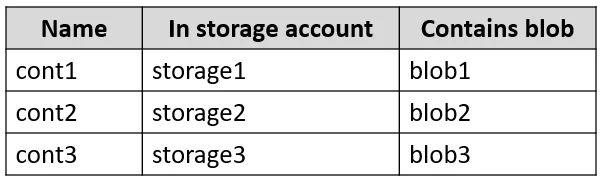
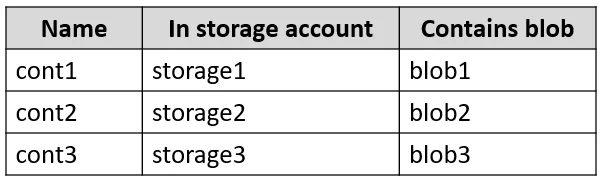
Hotspot Question You have an Azure subscription named Sub1 that contains the blob containers shown in the following table. Sub1 contains two users named User1 and User2. Both users are assigned the…
Azure ABAC (Attribute-Based Access Control) conditions act as filters on role assignments, allowing access only when specific resource attributes like container name or blob path are met.
Submitted by kavita_s· Mar 4, 2026Manage identities and governance
Question
Hotspot Question You have an Azure subscription named Sub1 that contains the blob containers shown in the following table. Sub1 contains two users named User1 and User2. Both users are assigned the Reader role at the Sub1 scope. You have a condition named Condition1 as shown in the following exhibit. You have a condition named Condition2 as shown in the following exhibit. You assign roles to User1 and User2 as shown in the following table. For each of the following statements, select Yes if the statement is true. Otherwise, select No. NOTE: Each correct selection is worth one point. Answer:
Exhibits


Options
- AIf the user performs a reading operation, then he may only read from "cont1"
- BIf the user performs a writing operation, then he may only write to blobs like "2"
Why each option
Azure ABAC (Attribute-Based Access Control) conditions act as filters on role assignments, allowing access only when specific resource attributes like container name or blob path are met.
AIf the user performs a reading operation, then he may only read from "cont1"
BIf the user performs a writing operation, then he may only write to blobs like "*2*"
Concept tested: Azure Attribute-Based Access Control (ABAC) and Role Assignment Conditions for Azure Storage
Source: https://learn.microsoft.com/en-us/azure/role-based-access-control/conditions-overview
Topics
#Azure RBAC#Condition-based Access#Blob Storage Access#Attribute-Based Access Control (ABAC)
Community Discussion
No community discussion yet for this question.