
AZ-104 · Question #659
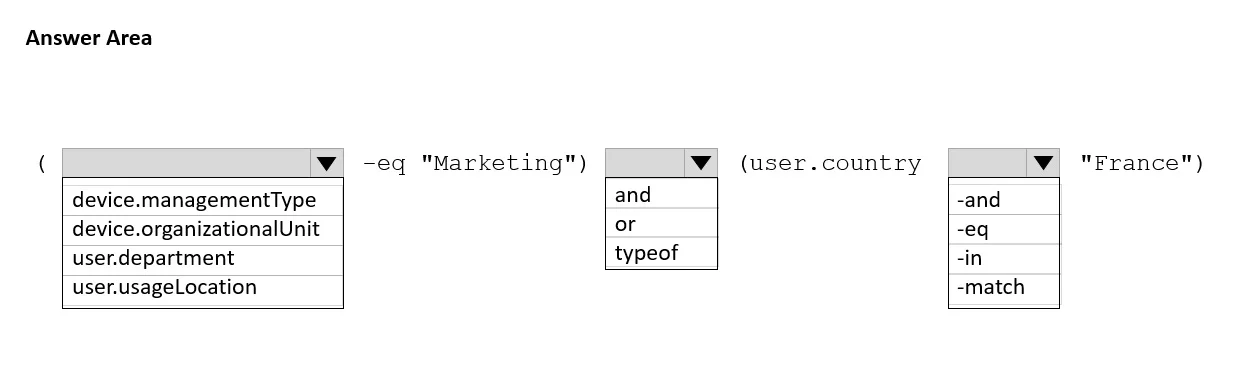
Hotspot Question You have an Azure AD tenant. You need to create a Microsoft 365 group that contains only members of a marketing department in France. How should you complete the dynamic membership…
The correct answer is Select attribute for 'Marketing': user.department; Select logical operator: and; Select operator for 'France': -eq. This question tests your ability to construct a dynamic membership rule in Azure AD that filters users based on department and country attributes to automatically populate a Microsoft 365 group.
Question
Exhibit
Answer Area
- Select attribute for 'Marketing'user.departmentdevice.managementTypedevice.organizationalUnituser.departmentuser.usageLocation
- Select logical operatorandandortypeof
- Select operator for 'France'-eq-and-eq-in-match
Explanation
This question tests your ability to construct a dynamic membership rule in Azure AD that filters users based on department and country attributes to automatically populate a Microsoft 365 group.
Approach. The correct dynamic membership rule should use the 'user.department' attribute with the '-eq' (equals) operator set to 'Marketing', combined using '-and' with the 'user.country' attribute using the '-eq' operator set to 'France'. The complete rule would look like: (user.department -eq "Marketing") -and (user.country -eq "France"). This ensures only users whose department is exactly 'Marketing' AND whose country is exactly 'France' are dynamically added to the group. The attributes 'user.department' and 'user.country' are standard Azure AD user properties that map to the Department and Country fields in a user's profile.
Concept tested. Azure AD Dynamic Group Membership Rules - specifically constructing multi-condition rules using user profile attributes (user.department and user.country) with comparison operators (-eq) and logical operators (-and) to automatically manage group membership based on user properties.
Reference. https://learn.microsoft.com/en-us/azure/active-directory/enterprise-users/groups-dynamic-membership
Topics
Community Discussion
No community discussion yet for this question.