
AZ-104 · Question #611
Hotspot Question You have an Azure subscription that contains a user named User1 and a storage account named storage1. The storage1 account contains the resources shown in the following table. User1…
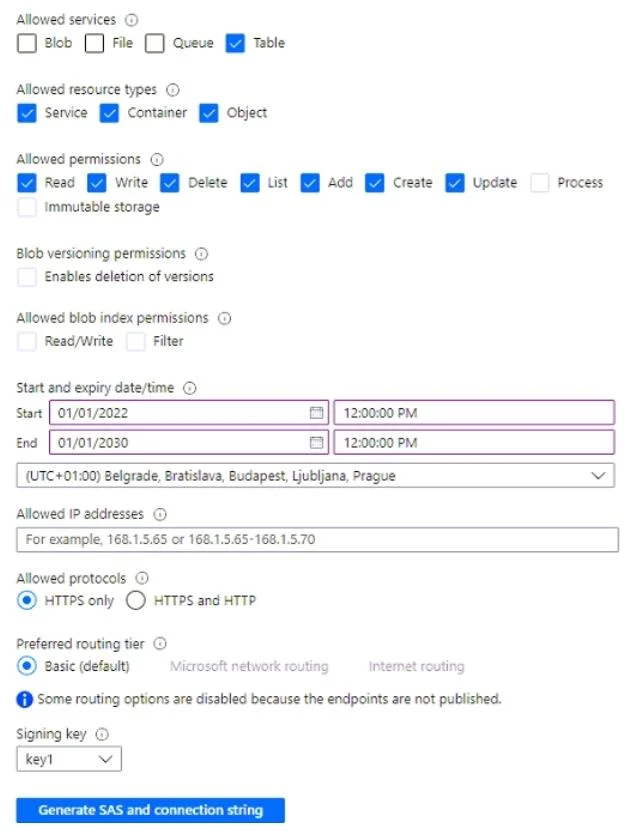
The correct answer is key1:: Table1, folder1, and container1; SAS1:: Table1 only. For key1: Storage account access keys, such as key1, provide Shared Key authorization, granting full administrative control over the entire storage account and all its resources. Therefore, User1, by using key1, can write to all resources in storage1, which include Table1 (a…
Question
Exhibits
Answer Area
- key1:Table1, folder1, and container1Table1 onlyTable1 and container1 onlyfolder1 and Table1 onlyfolder1 and container1 onlyTable1, folder1, and container1
- SAS1:Table1 onlyTable1 onlyTable1 and container1 onlyfolder1 and Table1 onlyfolder1 and container1 onlyTable1, folder1, and container1
Explanation
For key1:
Storage account access keys, such as key1, provide Shared Key authorization, granting full administrative control over the entire storage account and all its resources. Therefore, User1, by using key1, can write to all resources in storage1, which include Table1 (a Table), folder1 (a File share), and container1 (a Container/Blob resource).
For SAS1:
The Shared Access Signature (SAS1) is configured as shown in the exhibit. The exhibit indicates that the SAS is set to allow Blob, File, and Table services, with Write, Add, Create, and Update permissions checked across relevant resource types (including Container and Object for blobs). However, for this scenario, the correct answer states that User1 can only write to Table1 when using SAS1.
Topics
Community Discussion
No community discussion yet for this question.