
AZ-104 · Question #552
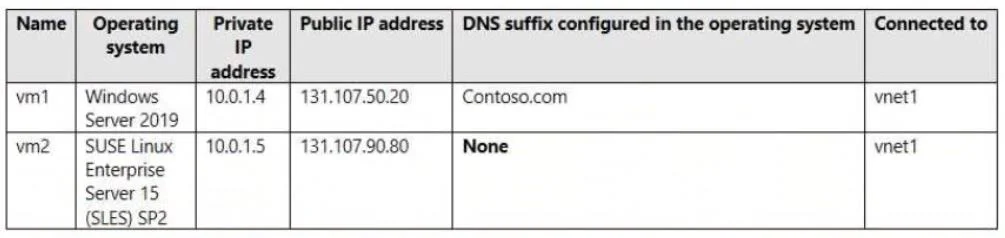
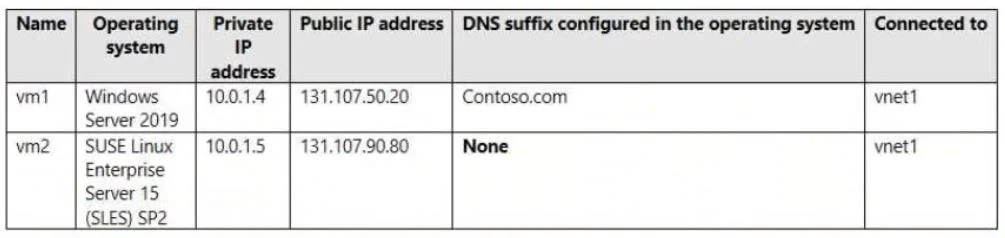
Hotspot Question You have two Azure virtual machines as shown in the following table. You create the Azure DNS zones shown in the following table. You perform the following actions: - For…
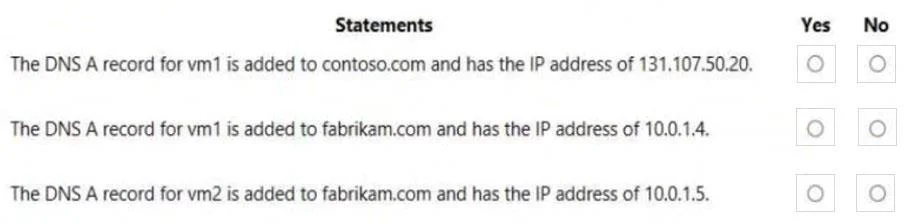
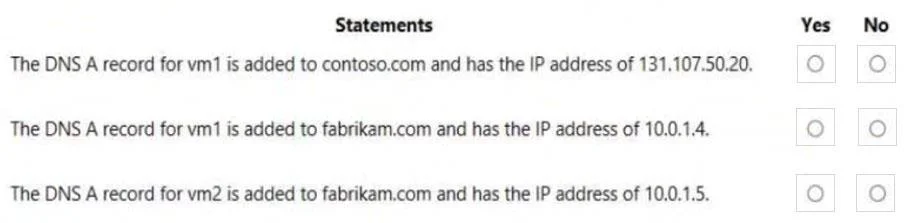
The correct answer is The DNS A record for vm1 is added to contoso.com and has the IP address of 131.107.50.20. = No; The DNS A record for vm1 is added to fabrikam.com and has the IP address of 10.0.1.4. = Yes; The DNS A record for vm2 is added to fabrikam.com and has the IP address of 10.0.1.5. = Yes. Azure Private DNS auto registration automatically creates DNS A records for virtual machines connected to a linked virtual network. Since fabrikam.com is linked to vnet1 with auto registration enabled, both vm1 (10.0.1.4) and vm2 (10.0.1.5) - which reside in vnet1 - will…
Question
Exhibits
Answer Area
- The DNS A record for vm1 is added to contoso.com and has the IP address of 131.107.50.20.No
- The DNS A record for vm1 is added to fabrikam.com and has the IP address of 10.0.1.4.Yes
- The DNS A record for vm2 is added to fabrikam.com and has the IP address of 10.0.1.5.Yes
Explanation
Azure Private DNS auto registration automatically creates DNS A records for virtual machines connected to a linked virtual network. Since fabrikam.com is linked to vnet1 with auto registration enabled, both vm1 (10.0.1.4) and vm2 (10.0.1.5) - which reside in vnet1 - will automatically have their private IP addresses registered as A records in fabrikam.com. Assigning the Owner role to vm1 and vm2 for contoso.com only grants RBAC permissions to manage the DNS zone resource itself; it does NOT create DNS records, so no A records are added to contoso.com.
Topics
Community Discussion
No community discussion yet for this question.