
AZ-104 · Question #551
Hotspot Question You have an Azure subscription. The subscription contains a virtual machine that runs Windows 10. You need to join the virtual machine to an Active Directory domain. How should you…
The correct answer is type: "Microsoft.Compute/virtualMachines/extensions"; Key for password configuration: "ProtectedSettings":{. To join an Azure VM to an Active Directory domain via an ARM template, the resource type must be 'Microsoft.Compute/VirtualMachines/extensions' and the domain password must be placed within 'ProtectedSettings' for security.
Question
Exhibit
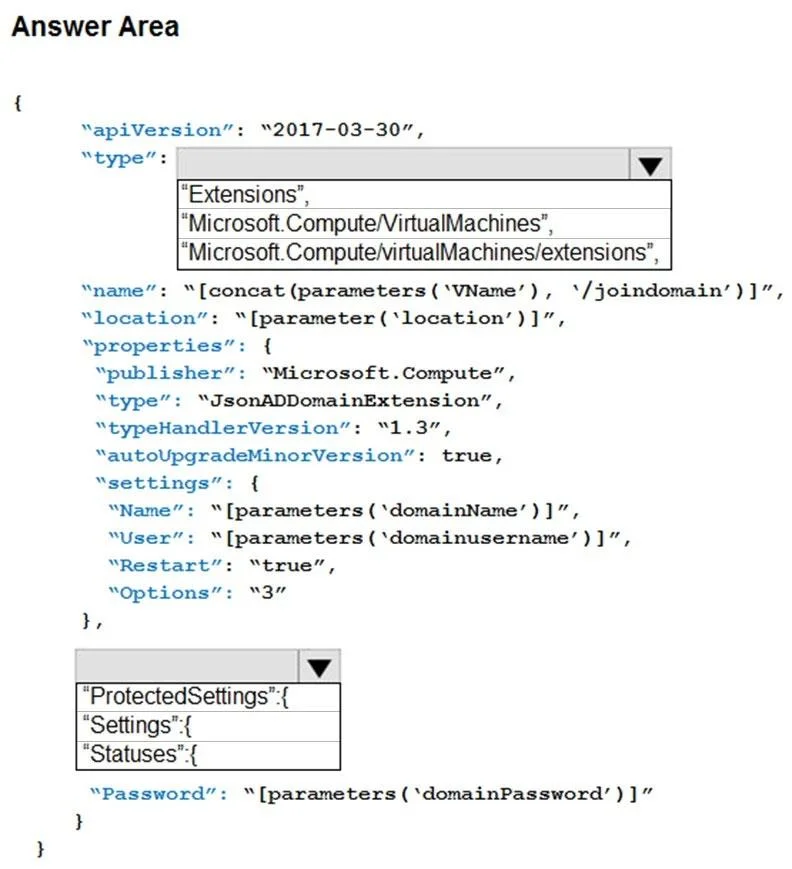
Answer Area
- type"Microsoft.Compute/virtualMachines/extensions""Extensions""Microsoft.Compute/VirtualMachines""Microsoft.Compute/virtualMachines/extensions"
- Key for password configuration"ProtectedSettings":{"ProtectedSettings":{"Settings":{"Statuses":{
Explanation
To join an Azure VM to an Active Directory domain via an ARM template, the resource type must be 'Microsoft.Compute/VirtualMachines/extensions' and the domain password must be placed within 'ProtectedSettings' for security.
Approach. 1. For the first dropdown (type resource property): The correct selection is Microsoft.Compute/VirtualMachines/extensions. This specifies that the resource being defined in the ARM template is an extension associated with a virtual machine. The JsonADDomainExtension is a VM extension, hence its parent resource type must be for extensions.
2. For the second dropdown (immediately preceding Password): The correct selection is ProtectedSettings. In ARM templates, sensitive information such as passwords must be placed in the protectedSettings section. This ensures that the data is encrypted both at rest and in transit, and cannot be retrieved in plain text after deployment, enhancing security.
Common mistakes.
- common_mistake. 1. Incorrect
typeselection: Choosing 'Extensions' is too generic and not a valid resource type in ARM for VM extensions. Choosing 'Microsoft.Compute/VirtualMachines' is incorrect because the template is defining an extension to a VM, not the VM itself.
- Incorrect password placement: Placing the
Passwordparameter under 'Settings' instead of 'ProtectedSettings' would be a significant security oversight. Data in the 'Settings' section is stored in plain text (or easily retrievable) and is not encrypted, making the domain password vulnerable. 'Statuses' is completely unrelated to configuring parameters and is used for reporting extension status.
Concept tested. This question tests the understanding of Azure Resource Manager (ARM) template syntax for deploying and configuring Virtual Machine (VM) extensions, specifically the JsonADDomainExtension (or similar Domain Join extension). It also assesses knowledge of secure handling of sensitive data (passwords) within ARM templates using protectedSettings, and the correct resource type hierarchy for VM extensions.
Topics
Community Discussion
No community discussion yet for this question.