
AZ-104 · Question #553
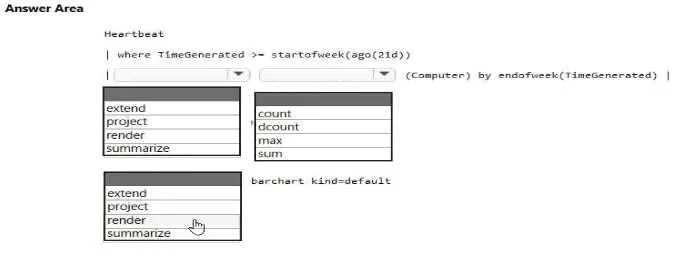
Hotspot Question You need to create a bar chart that shows the number of distinct computers that have sent heartbeats each week. How should you complete the Log Analytics query? To answer, select…
The correct answer is KQL operator for aggregation: summarize; Aggregation function for distinct count: dcount; KQL operator for rendering chart: render. To calculate the distinct count of computers per week and display it as a bar chart, the query requires the summarize operator with dcount and finally the render operator.
Question
Exhibit
Answer Area
- KQL operator for aggregationsummarizeextendprojectrendersummarize
- Aggregation function for distinct countdcountcountdcountmaxsum
- KQL operator for rendering chartrenderextendprojectrendersummarize
Explanation
To calculate the distinct count of computers per week and display it as a bar chart, the query requires the summarize operator with dcount and finally the render operator.
Approach. The question asks to create a bar chart showing the 'number of distinct computers' that have sent heartbeats 'each week'.
- First selection (
summarize): To aggregate data (like counting distinct items) and group it by a specific period (like 'each week'), thesummarizeoperator is used in KQL. It takes an aggregation function and abyclause for grouping. Since we needdcount(Computer) by endofweek(TimeGenerated),summarizeis the correct operator to precede this aggregation. - Second selection (
dcount): The requirement is for the 'number of distinct computers'. Thedcount()aggregation function is specifically designed to count the number of distinct values in a column.count()would count all entries, not just unique ones.max()andsum()are inappropriate for counting distinct entities. - Third selection (
render): The final output needs to be a 'bar chart'. Therenderoperator is used in KQL to visualize query results as various types of charts, includingbarchart. Thekind=defaultpart is a parameter for therenderoperator.
Therefore, the complete query structure correctly becomes: Heartbeat | where TimeGenerated >= startofweek(ago(21d)) | summarize dcount(Computer) by endofweek(TimeGenerated) | render barchart kind=default.
Common mistakes.
- common_mistake. 1. Using
countinstead ofdcount: Ifcountwas selected, the query would show the total number of heartbeat records for each computer per week, not the number of unique computers. The question explicitly asks for 'distinct computers', makingdcountessential.
- Using
extendorprojectinstead ofsummarize:extendis used to create new calculated columns, whileprojectis used to select, rename, or reorder columns. Neither of these operators performs aggregation and grouping as required by 'number of distinct computers... each week'. They would result in a syntax error or an incorrect data output that cannot be charted as intended. - Using
summarizefor the final step instead ofrender:summarizeis an aggregation operator. While it's crucial for the aggregation step, it does not display results as a chart.renderis specifically for visualization, making it the only correct choice for generating a bar chart.
Concept tested. Kusto Query Language (KQL) fundamentals, specifically the use of aggregation operators (summarize), aggregation functions (dcount), and visualization operators (render) for time-series analysis in Azure Log Analytics.
Reference. https://learn.microsoft.com/en-us/azure/data-explorer/kusto/query/summarizeoperator, https://learn.microsoft.com/en-us/azure/data-explorer/kusto/query/dcountfunction, https://learn.microsoft.com/en-us/azure/data-explorer/kusto/query/renderoperator
Topics
Community Discussion
No community discussion yet for this question.