
AZ-104 · Question #506
Hotspot Question You have the Azure resources shown on the following exhibit. You plan to track resource usage and prevent the deletion of resources. To which resources can you apply locks and tags?…
The correct answer is Tenant Root Group = Yes; MG1 = Yes; Sub1 = Yes; RG1 = Yes; VM1 = Yes. In Azure, resource locks and tags can only be applied to subscriptions, resource groups, and individual resources, but not to management groups.
Question
Exhibits
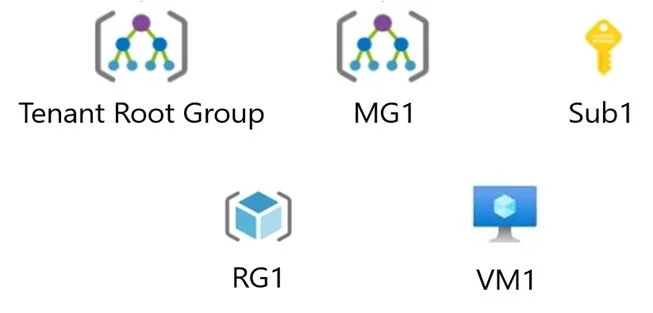
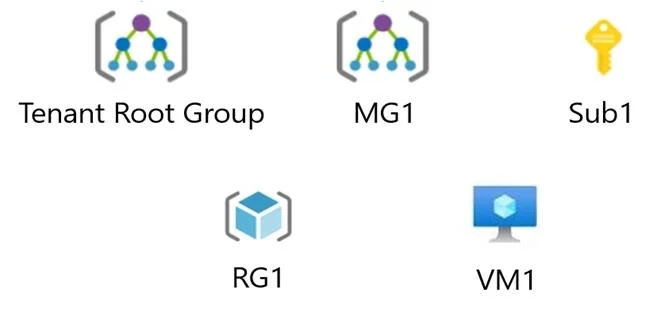
Answer Area
- Tenant Root GroupYes
- MG1Yes
- Sub1Yes
- RG1Yes
- VM1Yes
Explanation
In Azure, resource locks and tags can only be applied to subscriptions, resource groups, and individual resources, but not to management groups.
Approach. For 'Locks': Azure Resource Locks (such as CanNotDelete or ReadOnly) are used to prevent accidental deletion or modification. They can be applied at the Subscription (Sub1), Resource Group (RG1), and Resource (VM1) levels. They cannot be applied to Management Groups. Thus, 'Sub1, RG1, and VM1 only' is correct.
For 'Tags': Tags are metadata (key-value pairs) used to logically organize resources for billing or management. Like locks, tags can only be applied directly to Subscriptions (Sub1), Resource Groups (RG1), and individual Resources (VM1). They are not supported on Management Groups. Thus, 'Sub1, RG1, and VM1 only' is also correct here.
Common mistakes.
- common_mistake. A common mistake is assuming that because Management Groups sit at the top of the hierarchy and can be used to assign Azure Policies or RBAC roles, they can also hold standard resource tags and locks. Selecting any option that includes 'MG1' or 'Tenant Root Group' is incorrect. Likewise, selecting options that omit the Subscription ('RG1 and VM1 only') is wrong because subscriptions fully support both features.
Concept tested. Azure Resource Manager (ARM) organizational hierarchy, specifically the supported scopes for applying Resource Locks and Tags.
Reference. https://learn.microsoft.com/en-us/azure/azure-resource-manager/management/tag-resources
Topics
Community Discussion
No community discussion yet for this question.