
AZ-104 · Question #437
Note: This question is part of a series of questions that present the same scenario. Each question in the series contains a unique solution that might meet the stated goals. Some question sets might…
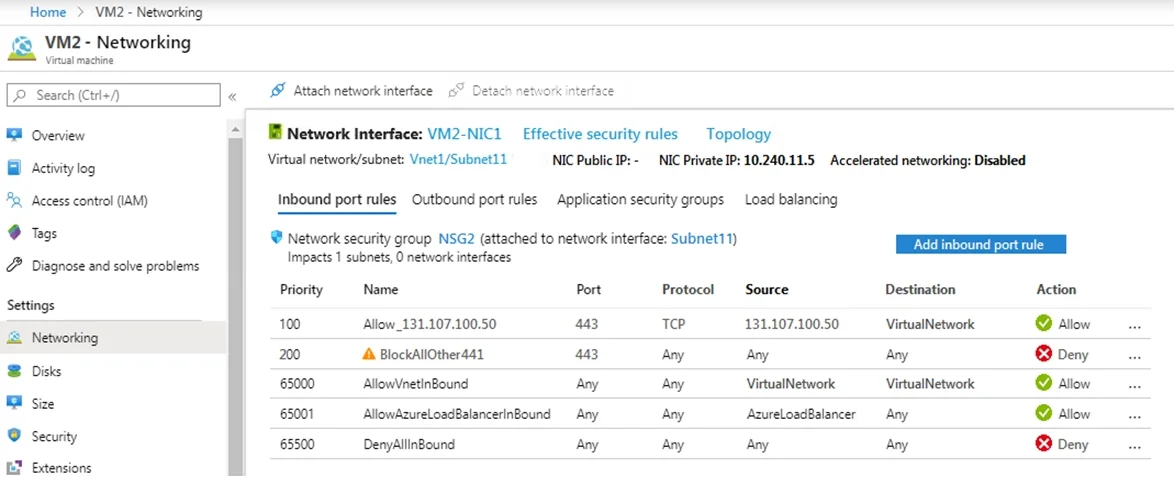
The correct answer is B. No. You want to establish a successful connection from 131.107.100.50 over TCP port 43, and the solution suggests to create a deny inbound rule with low priority. It doesn’t make any sense. Virtual machines in load-balanced pools: The source port and address range applied are from…
Question
Exhibits
Options
- AYes
- BNo
How the community answered
(19 responses)- A47% (9)
- B53% (10)
Explanation
You want to establish a successful connection from 131.107.100.50 over TCP port 43, and the solution suggests to create a deny inbound rule with low priority. It doesn’t make any sense. Virtual machines in load-balanced pools: The source port and address range applied are from the originating computer, not the load balancer. The destination port and address range are for the destination computer, not the load balancer. AllowAzureLoadBalancerInBound: The AzureLoadBalancer service tag translates to the virtual IP address of the host, 168.63.129.16 where the Azure health probe originates. Actual traffic does not travel through here, and if you don’t use Azure Load Balancing, this rule can be overridden. https://docs.microsoft.com/en-us/azure/virtual-network/network-security-groups-overview#azure- platform-considerations https://msazure.club/addendum-of-azure-load-balancer-and-nsg-rules
Community Discussion
No community discussion yet for this question.