
Microsoft
AZ-104 · Question #417
Note: This question is part of a series of questions that present the same scenario. Each question in the series contains a unique solution that might meet the stated goals. Some question sets might…
The correct answer is A. Yes. User3 requires a user account in Azure AD. Note: Your Azure AD password is considered an authentication method. It is the one method that cannot be disabled. https://docs.microsoft.com/en-us/azure/active-directory/authentication/concept-authentication-
Submitted by andreas_gr· Mar 4, 2026Manage identities and governance
Question
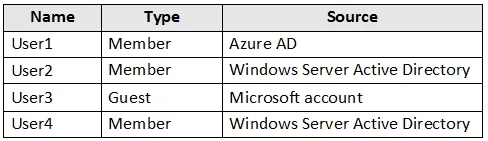
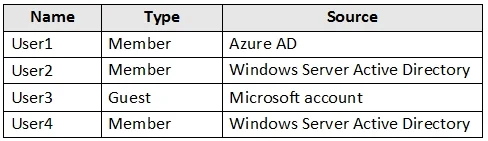
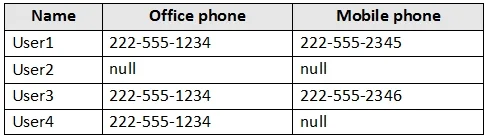
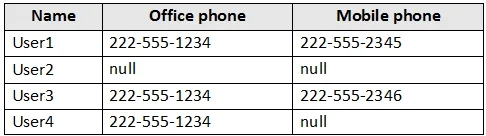
Note: This question is part of a series of questions that present the same scenario. Each question in the series contains a unique solution that might meet the stated goals. Some question sets might have more than one correct solution, while others might not have a correct solution. After you answer a question in this section, you will NOT be able to return to it. As a result, these questions will not appear in the review screen. You have an Azure Active Directory (Azure AD) tenant named contoso.com that is synced to an Active Directory domain. The tenant contains the users shown in the following table. The users have the attributes shown in the following table. You need to ensure that you can enable Azure Multi-Factor Authentication (MFA) for all users. Solution: You create a new user account in Azure AD for User3. Does this meet the goal?
Exhibits
Options
- AYes
- BNo
How the community answered
(26 responses)- A69% (18)
- B31% (8)
Explanation
User3 requires a user account in Azure AD. Note: Your Azure AD password is considered an authentication method. It is the one method that cannot be disabled. https://docs.microsoft.com/en-us/azure/active-directory/authentication/concept-authentication-
Community Discussion
No community discussion yet for this question.