
Microsoft
AZ-104 · Question #413
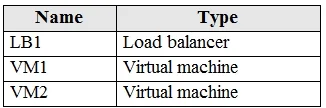
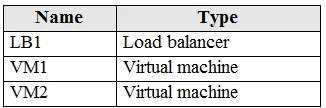
You have an Azure subscription that contains the resources shown in the following table. VM1 and VM2 run a website that is configured as shown in the following table. LB1 is configured to balance…
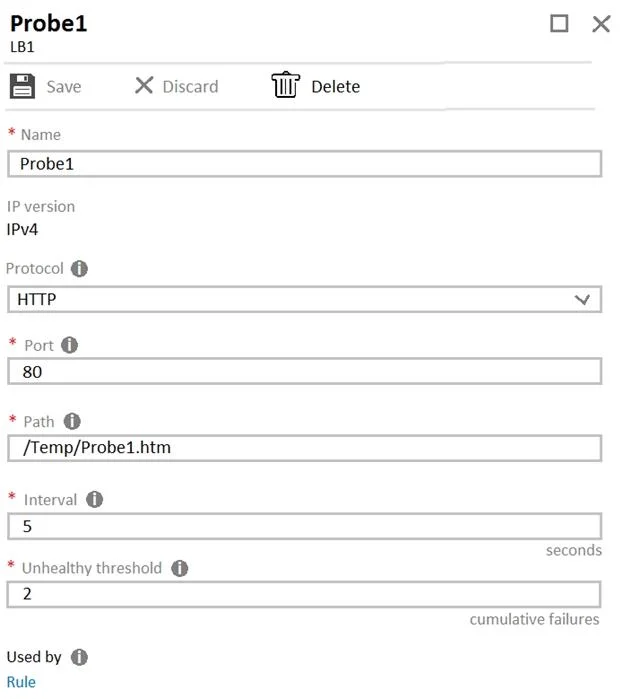
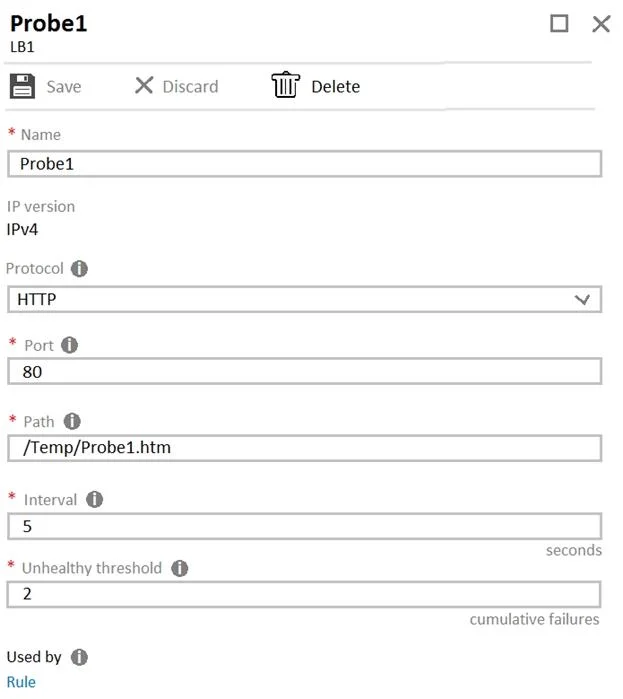
The correct answer is D. On VM1 and VM2, create a file named Probe1.htm in the C:\intepub\wwwroot\SiteA\Temp folder. https://docs.microsoft.com/en-us/azure/load-balancer/tutorial-load-balancer-standard-internal-
Submitted by hans_de· Mar 4, 2026Configure and manage virtual networking
Question
You have an Azure subscription that contains the resources shown in the following table. VM1 and VM2 run a website that is configured as shown in the following table. LB1 is configured to balance requests to VM1 and VM2. You configure a health probe as shown in the exhibit. (Click the Exhibit tab.) You need to ensure that the health probe functions correctly. What should you do?
Exhibits
Options
- AOn LB1, change the Unhealthy threshold to 65536.
- BOn LB1, change the port to 8080.
- COn VM1 and VM2, create a file named Probe1.htm in the C:\intepub\wwwroot\Temp folder.
- DOn VM1 and VM2, create a file named Probe1.htm in the C:\intepub\wwwroot\SiteA\Temp folder.
How the community answered
(65 responses)- A8% (5)
- B14% (9)
- C5% (3)
- D74% (48)
Explanation
https://docs.microsoft.com/en-us/azure/load-balancer/tutorial-load-balancer-standard-internal-
Community Discussion
No community discussion yet for this question.