
AZ-104 · Question #342
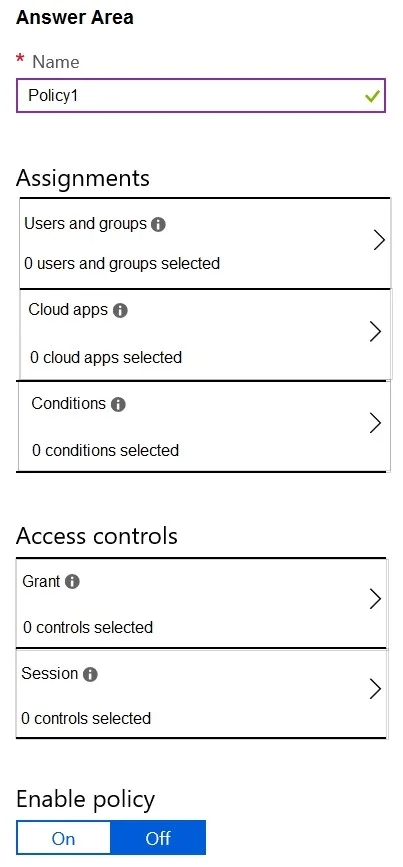
Hotspot Question You have an Azure Active Directory (Azure AD) tenant. You need to create a conditional access policy that requires all users to use multi-factor authentication when they access the…
The correct answer is Enable policy: On. To require multi-factor authentication for all users accessing the Azure portal, configure Users and groups, Cloud apps, and the Grant control within an Azure AD Conditional Access policy.
Question
Exhibit
Answer Area
- Enable policyOnOnOff
Explanation
To require multi-factor authentication for all users accessing the Azure portal, configure Users and groups, Cloud apps, and the Grant control within an Azure AD Conditional Access policy.
Approach. The question asks to configure a Conditional Access policy that requires all users to use multi-factor authentication when they access the Azure portal. This requires configuring three specific settings:
- Users and groups: To target 'all users', this section must be configured. Inside, you would select 'All users'.
- Cloud apps: To specify that the policy applies when users 'access the Azure portal', this section must be configured. Inside, you would select 'Microsoft Azure Management' (which represents the Azure portal and related management services).
- Grant: To 'require multi-factor authentication', this access control section must be configured. Inside, you would select 'Grant access' and then specifically check 'Require multi-factor authentication'.
These three settings directly address the 'who', 'what', and 'how' of the policy as stated in the problem description, making them the essential configurations.
Common mistakes.
- common_mistake. Common mistakes include selecting 'Conditions' instead of one of the core assignments or access controls. While 'Conditions' can refine a policy (e.g., by location, device platform), they are not essential for the basic 'all users + Azure portal + MFA' requirement. Another mistake is choosing 'Session' controls, which manage ongoing session behavior, rather than 'Grant' controls, which dictate the initial access requirements like MFA. Lastly, selecting 'Enable policy' is incorrect because it's an activation switch for the policy, not a configuration setting within the policy's logic itself.
Concept tested. The core concept being tested is the fundamental structure and configuration of Azure AD Conditional Access policies, specifically understanding how to define assignments (who and what) and access controls (how) to enforce specific requirements like multi-factor authentication.
Reference. https://learn.microsoft.com/en-us/azure/active-directory/conditional-access/overview
Topics
Community Discussion
No community discussion yet for this question.