
Microsoft
AZ-104 · Question #337
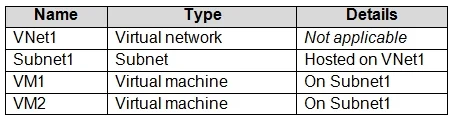
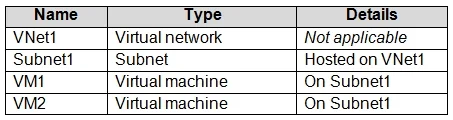
You have an Azure subscription that contains the resources in the following table. VM1 and VM2 are deployed from the same template and host line-of-business applications. You configure the network…
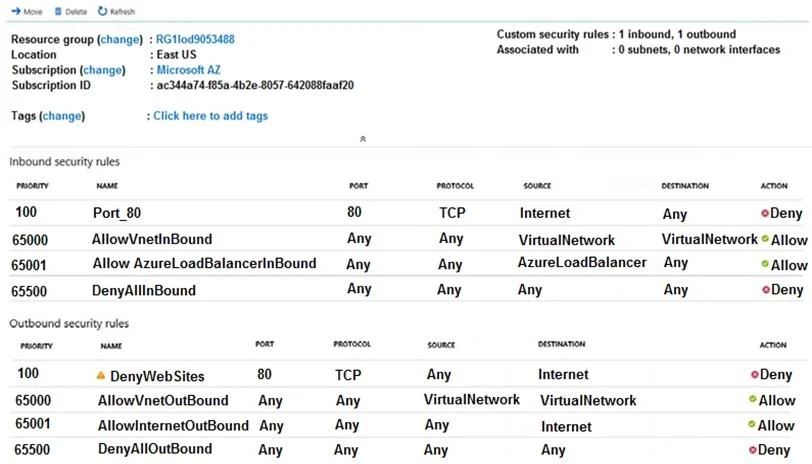
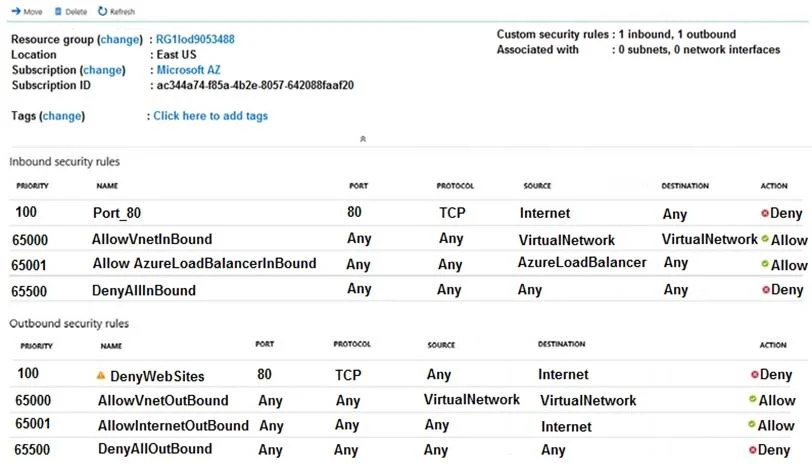
The correct answer is C. Associate the NSG to Subnet1. You can associate or dissociate a network security group from a network interface or subnet. The NSG has the appropriate rule to block users from accessing the Internet. We just need to associate it with Subnet1…
Submitted by jian89· Mar 4, 2026Configure and manage virtual networking
Question
You have an Azure subscription that contains the resources in the following table. VM1 and VM2 are deployed from the same template and host line-of-business applications. You configure the network security group (NSG) shown in the exhibit. (Click the Exhibit tab.) You need to prevent users of VM1 and VM2 from accessing websites on the Internet over TCP port 80. What should you do?
Exhibits
Options
- ADisassociate the NSG from a network interface
- BChange the Port_80 inbound security rule.
- CAssociate the NSG to Subnet1.
- DChange the DenyWebSites outbound security rule.
How the community answered
(21 responses)- A10% (2)
- B5% (1)
- C71% (15)
- D14% (3)
Explanation
You can associate or dissociate a network security group from a network interface or subnet. The NSG has the appropriate rule to block users from accessing the Internet. We just need to associate it with Subnet1. https://docs.microsoft.com/en-us/azure/virtual-network/manage-network-security-group
Community Discussion
No community discussion yet for this question.