
AZ-104 · Question #296
Hotspot Question You have an Azure subscription named Subscription1 that has a subscription ID of c276fc76- 9cd4-44c9- 99a7-4fd71546436e. You need to create a custom RBAC role named CR1 that meets…
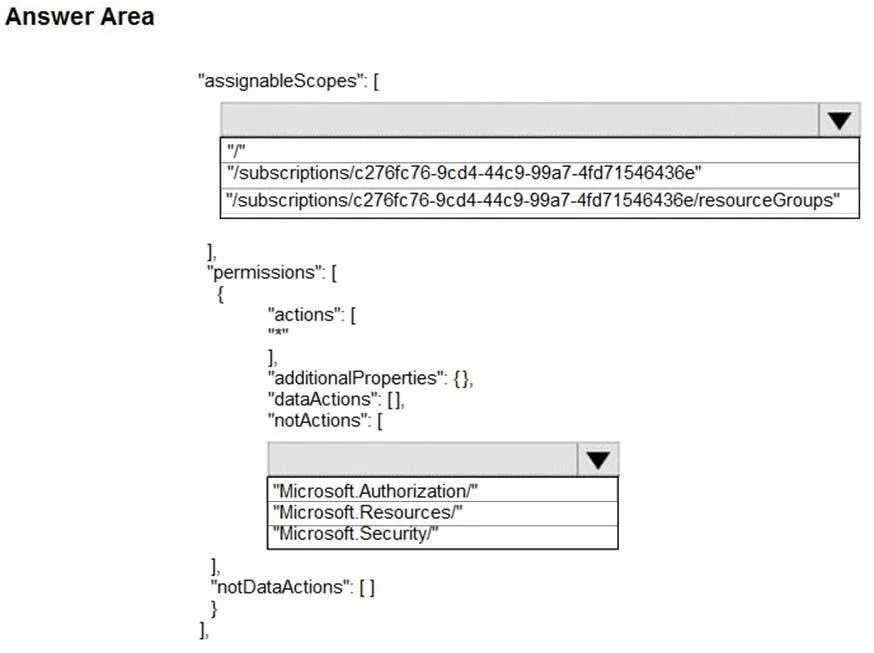
The correct answer is assignableScopes: "/subscriptions/c276fc76-9cd4-44c9-99a7-4fd71546436e/resourceGroups"; notActions: "Microsoft.Authorization/". To define a custom RBAC role assignable only to resource groups and preventing access management, specify the resource group scope and exclude Microsoft.Authorization actions.
Question
Exhibits
Answer Area
- assignableScopes"/subscriptions/c276fc76-9cd4-44c9-99a7-4fd71546436e/resourceGroups""/""/subscriptions/c276fc76-9cd4-44c9-99a7-4fd71546436e""/subscriptions/c276fc76-9cd4-44c9-99a7-4fd71546436e/resourceGroups"
- notActions"Microsoft.Authorization/""Microsoft.Authorization/""Microsoft.Resources/""Microsoft.Security/"
Explanation
To define a custom RBAC role assignable only to resource groups and preventing access management, specify the resource group scope and exclude Microsoft.Authorization actions.
Approach. 1. For assignableScopes: The requirement is 'Can be assigned only to the resource groups in Subscription1'. This directly corresponds to the scope path /subscriptions/c276fc76-9cd4-44c9-99a7-4fd71546436e/resourceGroups. Selecting this ensures the custom role can only be assigned at the resource group level within the specified subscription.
2. For permissions.notActions: The requirement is 'Prevents the management of the access permissions for the resource groups'. Access permissions management in Azure RBAC falls under the Microsoft.Authorization resource provider (e.g., Microsoft.Authorization/roleAssignments/write, Microsoft.Authorization/roleDefinitions/delete). By selecting Microsoft.Authorization/ in notActions, all operations under this resource provider are explicitly denied, effectively preventing the management of access permissions. The actions: ["*"] grants all other control plane operations, which, in combination with notActions: ["Microsoft.Authorization/"], allows viewing, creating, modifying, and deleting of resources (as required) while preventing access management.
Common mistakes.
- common_mistake. 1. Incorrect
assignableScopes:- Selecting
/(root scope) is incorrect because it allows the role to be assigned across all subscriptions, not just resource groups in Subscription1. - Selecting
/subscriptions/c276fc76-9cd4-44c9-99a7-4fd71546436eis incorrect because it allows the role to be assigned at the subscription level, which means it would apply to all resource groups and resources within that subscription, but the question explicitly states it should be assignable only to the resource groups, implying the assignment target is the resource group itself.
- Selecting
- Incorrect
notActions:- Selecting
Microsoft.Resources/is incorrect because it would prevent all actions related to generic resource management (creating, deleting, modifying resources), which directly contradicts the requirement to allow 'viewing, creating, modifying, and deleting of resources within the resource groups'. - Selecting
Microsoft.Security/is incorrect because it targets security-related operations (e.g., security policies, alerts, secure scores) and does not prevent the management of access permissions, which is handled byMicrosoft.Authorization.
- Selecting
Concept tested. Azure Custom Role-Based Access Control (RBAC) definition, specifically understanding assignableScopes for setting the scope of role assignments and using notActions to deny specific control plane operations (resource providers like Microsoft.Authorization for access management, Microsoft.Resources for resource operations) within an actions: ["*"] wildcard permission.
Reference. https://docs.microsoft.com/en-us/azure/role-based-access-control/custom-roles
Topics
Community Discussion
No community discussion yet for this question.