
AZ-104 · Question #289
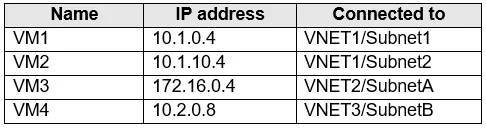
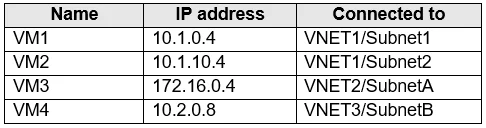
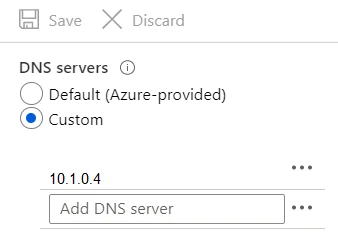
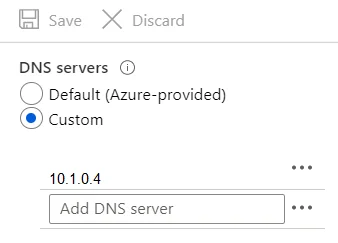
You have the Azure virtual machines shown in the following table. A DNS service is installed on VM1. You configure the DNS servers settings for each virtual network as shown in the following…
The correct answer is D. Configure peering between VNET1, VNET2, and VNET3. Virtual network peering enables you to seamlessly connect networks in Azure Virtual Network. The virtual networks appear as one for connectivity purposes. The traffic between virtual machines uses the Microsoft backbone infrastructure. Incorrect Answers: B, C: Virtual Network…
Question
Exhibits
Options
- AConfigure a conditional forwarder on VM1
- BAdd service endpoints on VNET1
- CAdd service endpoints on VNET2 and VNET3
- DConfigure peering between VNET1, VNET2, and VNET3
How the community answered
(42 responses)- A5% (2)
- B2% (1)
- C10% (4)
- D83% (35)
Explanation
Virtual network peering enables you to seamlessly connect networks in Azure Virtual Network. The virtual networks appear as one for connectivity purposes. The traffic between virtual machines uses the Microsoft backbone infrastructure. Incorrect Answers: B, C: Virtual Network (VNet) service endpoint provides secure and direct connectivity to Azure services over an optimized route over the Azure backbone network. Endpoints allow you to secure your critical Azure service resources to only your virtual networks. Service Endpoints enables private IP addresses in the VNet to reach the endpoint of an Azure service without needing a public IP address on the VNet. https://docs.microsoft.com/en-us/azure/virtual-network/virtual-network-service-endpoints-overview https://docs.microsoft.com/en-us/azure/virtual-network/virtual-network-peering-overview
Community Discussion
No community discussion yet for this question.