
AZ-104 · Question #274
You have an Azure subscription that contains the resources in the following table. Store1 contains a file share named data. Data contains 5,000 files. You need to synchronize the files in the file…
The correct answer is B. Register Server1 C. Install the Azure File Sync agent on Server1 E. Create a sync group. Step 1 (C): Install the Azure File Sync agent on Server1 The Azure File Sync agent is a downloadable package that enables Windows Server to be synced with an Azure file share Step 2 (B): Register Server1. Register Windows Server with Storage Sync Service Registering your…
Question
Exhibits
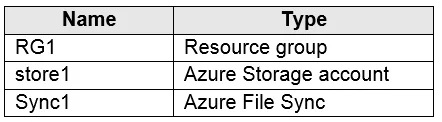
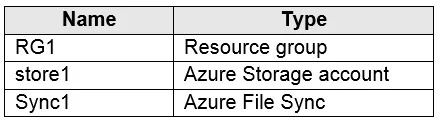
Options
- ACreate a container instance
- BRegister Server1
- CInstall the Azure File Sync agent on Server1
- DDownload an automation script
- ECreate a sync group
How the community answered
(43 responses)- A7% (3)
- B81% (35)
- D12% (5)
Explanation
Step 1 (C): Install the Azure File Sync agent on Server1 The Azure File Sync agent is a downloadable package that enables Windows Server to be synced with an Azure file share Step 2 (B): Register Server1. Register Windows Server with Storage Sync Service Registering your Windows Server with a Storage Sync Service establishes a trust relationship between your server (or cluster) and the Storage Sync Service. Step 3 (E): Create a sync group and a cloud endpoint. A sync group defines the sync topology for a set of files. Endpoints within a sync group are kept in sync with each other. A sync group must contain one cloud endpoint, which represents an Azure file share and one or more server endpoints. A server endpoint represents a path on registered server. https://docs.microsoft.com/en-us/azure/storage/files/storage-sync-files-deployment-guide
Community Discussion
No community discussion yet for this question.