
AZ-104 · Question #268
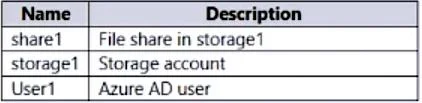
You have an Azure subscription that contains the resources shown in the following table. You need to assign User1 the Storage File Data SMB Share Contributor role for share1. What should you do first?
The correct answer is B. Configure Access control (IAM) for share1. To assign an Azure role to an Azure AD identity, using the Azure portal, follow these steps: In the Azure portal, go to your file share, or create a file share. Select Access Control (IAM). Select Add a role assignment In the Add role assignment blade, select the appropriate…
Question
Exhibits
Options
- AModify the security profile for the file shares in storage1.
- BConfigure Access control (IAM) for share1.
- CSelect Default to Azure Active Directory authorization in the Azure portal for storage!.
- DEnable identity-based data access for the file shares in storage1.
How the community answered
(30 responses)- A10% (3)
- B80% (24)
- C3% (1)
- D7% (2)
Explanation
To assign an Azure role to an Azure AD identity, using the Azure portal, follow these steps: In the Azure portal, go to your file share, or create a file share. Select Access Control (IAM). Select Add a role assignment In the Add role assignment blade, select the appropriate built-in role from the Role list. Storage File Data SMB Share Reader Storage File Data SMB Share Contributor Storage File Data SMB Share Elevated Contributor Leave Assign access to at the default setting: Azure AD user, group, or service principal. Select the target Azure AD identity by name or email address. The selected Azure AD identity must be a hybrid identity and cannot be a cloud only identity. This means that the same identity is also represented in AD DS. Select Save to complete the role assignment operation. https://learn.microsoft.com/en-us/azure/storage/files/storage-files-identity-ad-ds-assign- permissions?tabs=azure-portal
Community Discussion
No community discussion yet for this question.