
AZ-104 · Question #239
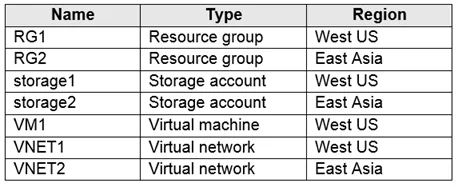
Note: This question is part of a series of questions that present the same scenario. Each question in the series contains a unique solution that might meet the stated goals. Some question sets might…
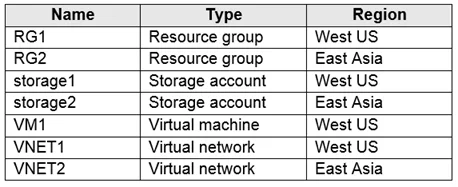
The correct answer is B. No. Instead, you should delete VM1. Then recreate VM1 and add the network interface for VM1. To migrate a VM from a VNET to another VNET. The only option is to delete the VM and redeploy it using a new NIC and NIC connected to VNET2. Note: When you create an Azure Virtual Machine…
Question
Exhibits
Options
- AYes
- BNo
How the community answered
(29 responses)- A38% (11)
- B62% (18)
Explanation
Instead, you should delete VM1. Then recreate VM1 and add the network interface for VM1. To migrate a VM from a VNET to another VNET. The only option is to delete the VM and redeploy it using a new NIC and NIC connected to VNET2. Note: When you create an Azure Virtual Machine (VM), you must create a Virtual Network (VNet) or use an existing VNet. You can change the subnet a VM is connected to after it's created, but you cannot change the VNet. You can also change the size of a VM. https://docs.microsoft.com/en-us/azure/virtual-machines/windows/network-overview
Community Discussion
No community discussion yet for this question.