
Microsoft
AZ-104 · Question #232
You have an Azure subscription that contains a resource group named RG26. RG26 is set to the West Europe location and is used to create temporary resources for a project. RG26 contains the resources…
The correct answer is C. Stop the backup of SQLDB01. VM's running or not would not block the deletion of a Resource Group. Storage Accounts also don't block the deletion of a Resource Group. https://docs.microsoft.com/en-us/azure/azure-resource-manager/management/delete-resource…
Submitted by obi.ng· Mar 4, 2026Monitor and back up Azure resources
Question
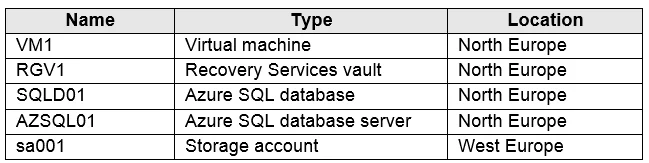
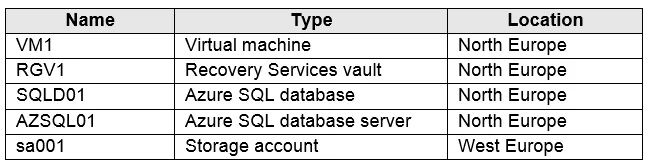
You have an Azure subscription that contains a resource group named RG26. RG26 is set to the West Europe location and is used to create temporary resources for a project. RG26 contains the resources shown in the following table. SQLDB01 is backed up to RGV1. When the project is complete, you attempt to delete RG26 from the Azure portal. The deletion fails. You need to delete RG26. What should you do first?
Exhibits
Options
- ADelete VM1
- BStop VM1
- CStop the backup of SQLDB01
- DDelete sa001
How the community answered
(45 responses)- A9% (4)
- B18% (8)
- C42% (19)
- D31% (14)
Explanation
VM's running or not would not block the deletion of a Resource Group. Storage Accounts also don't block the deletion of a Resource Group. https://docs.microsoft.com/en-us/azure/azure-resource-manager/management/delete-resource- group?tabs=azure-powershell#required-access-and-deletion-failures https://docs.microsoft.com/en-us/azure/backup/backup-azure-delete-vault?tabs=portal#before-
Community Discussion
No community discussion yet for this question.