
AZ-104 · Question #200
Hotspot Question You have an Azure subscription. You plan to use an Azure Resource Manager template to deploy a virtual network named VNET1 that will use Azure Bastion. How should you complete the…
The correct answer is name: AzureBastionSubnet; addressPrefix: 10.10.10.0/27. To correctly configure an Azure Bastion subnet, it must be named 'AzureBastionSubnet' and allocated a minimum address prefix of /27.
Question
Exhibit
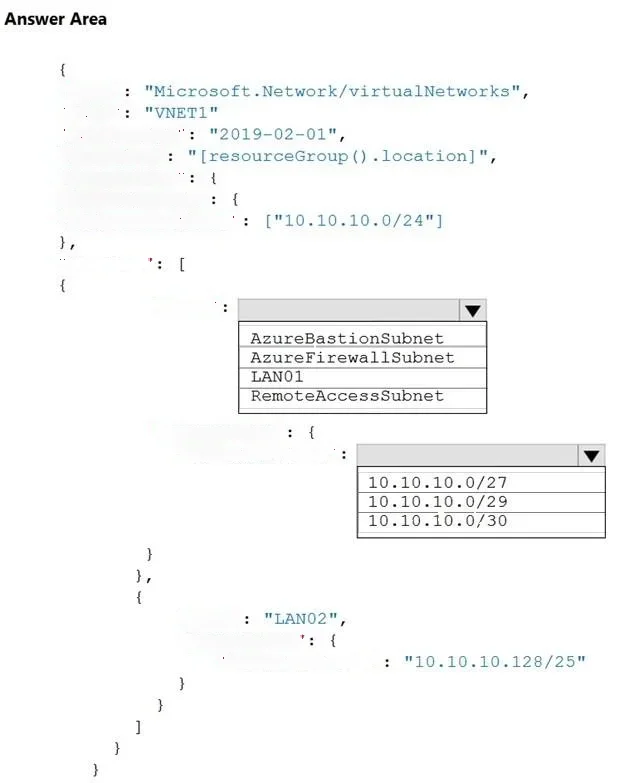
Answer Area
- nameAzureBastionSubnetAzureBastionSubnetAzureFirewallSubnetLAN01RemoteAccessSubnet
- addressPrefix10.10.10.0/2710.10.10.0/2710.10.10.0/2910.10.10.0/30
Explanation
To correctly configure an Azure Bastion subnet, it must be named 'AzureBastionSubnet' and allocated a minimum address prefix of /27.
Approach. The question explicitly states that the virtual network 'will use Azure Bastion'. Azure Bastion has specific requirements for its dedicated subnet:
- Name: The subnet MUST be named 'AzureBastionSubnet'. This is a mandatory naming convention for the service to recognize and utilize the subnet.
- Size (addressPrefix): The subnet MUST have an address prefix of at least /27 (e.g., /27, /26, /25, etc.). A /27 prefix provides 32 IP addresses, which is the minimum required as Azure reserves several IPs within the subnet for its internal operations. Looking at the available options:
- '10.10.10.0/27' provides 32 IPs, meeting the requirement.
- '10.10.10.0/29' provides 8 IPs, which is too small.
- '10.10.10.0/30' provides 4 IPs, which is too small.
Therefore, the correct selections are:
- For the 'name' field: AzureBastionSubnet
- For the 'properties.addressPrefix' field: 10.10.10.0/27
Common mistakes.
- common_mistake. Common mistakes include selecting an incorrect subnet name or an insufficient address prefix size:
- Incorrect Name: Selecting 'AzureFirewallSubnet' is incorrect because that name is reserved for Azure Firewall. 'LAN01' or 'RemoteAccessSubnet' are generic names and would not be recognized by Azure as the Bastion subnet, preventing the service from being deployed or functioning correctly.
- Incorrect Address Prefix: Choosing '10.10.10.0/29' or '10.10.10.0/30' is incorrect because these CIDR prefixes allocate too few IP addresses (8 and 4 respectively). Azure Bastion requires a minimum of 32 IP addresses, corresponding to a /27 prefix, to account for reserved addresses and service operations. Attempting to deploy Bastion to a smaller subnet will result in a deployment failure.
Concept tested. Azure Bastion deployment requirements, specifically the mandatory naming convention and minimum address space (CIDR prefix) for the dedicated Bastion subnet. This tests knowledge of Azure networking fundamentals, service-specific subnet requirements, and ARM template configuration.
Reference. https://learn.microsoft.com/en-us/azure/bastion/bastion-faq#minimumsubnet
Topics
Community Discussion
No community discussion yet for this question.