
AZ-104 · Question #138
Hotspot Question You plan to use Azure Network Watcher to perform the following tasks: - Task1: Identify a security rule that prevents a network packet from reaching an Azure virtual machine…
Use IP flow verify to identify NSG rules blocking specific traffic, and Connection troubleshoot to validate end-to-end reachability to external destinations.
Question
Exhibit
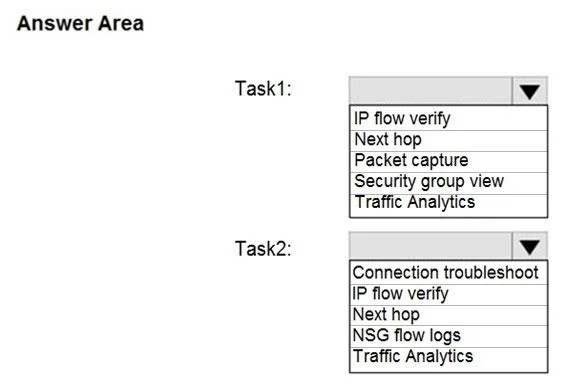
Answer Area
- Task1:IP flow verifyNext hopPacket captureSecurity group viewTraffic Analytics
- Task2:Connection troubleshootIP flow verifyNext hopNSG flow logsTraffic Analytics
Explanation
Use IP flow verify to identify NSG rules blocking specific traffic, and Connection troubleshoot to validate end-to-end reachability to external destinations.
Approach. For Task 1, 'IP flow verify' is the correct choice because it simulates a packet flow based on 5-tuple parameters (source/destination IP and port, protocol). It reports whether access is allowed or denied and explicitly names the Network Security Group (NSG) and the specific rule responsible for the outcome. For Task 2, 'Connection troubleshoot' is required because it actively tests TCP connectivity from a VM to a specified destination (like an external FQDN, URI, or IP address). It verifies actual end-to-end reachability, routing, and latency, rather than just checking local security configuration.
Common mistakes.
- common_mistake. For Task 1, users might incorrectly choose 'Security group view'. While this shows all applied rules, it doesn't actively test a specific packet flow to pinpoint exactly which rule is causing a block. For Task 2, selecting 'IP flow verify' is a common mistake; IP flow verify only confirms if local NSG rules allow the traffic to leave the VM's network interface, but it does not actually traverse the network to verify that the external host is online and reachable.
Concept tested. Azure Network Watcher diagnostic capabilities (IP Flow Verify vs. Connection Troubleshoot)
Reference. https://learn.microsoft.com/en-us/azure/network-watcher/network-watcher-monitoring-overview
Topics
Community Discussion
No community discussion yet for this question.