
AI-102 · Question #203
SIMULATION You need to create and publish a bot that will use Language Understanding and QnA Maker. The bot must be named bot12345678. You must publish the bot by using the [email protected]…
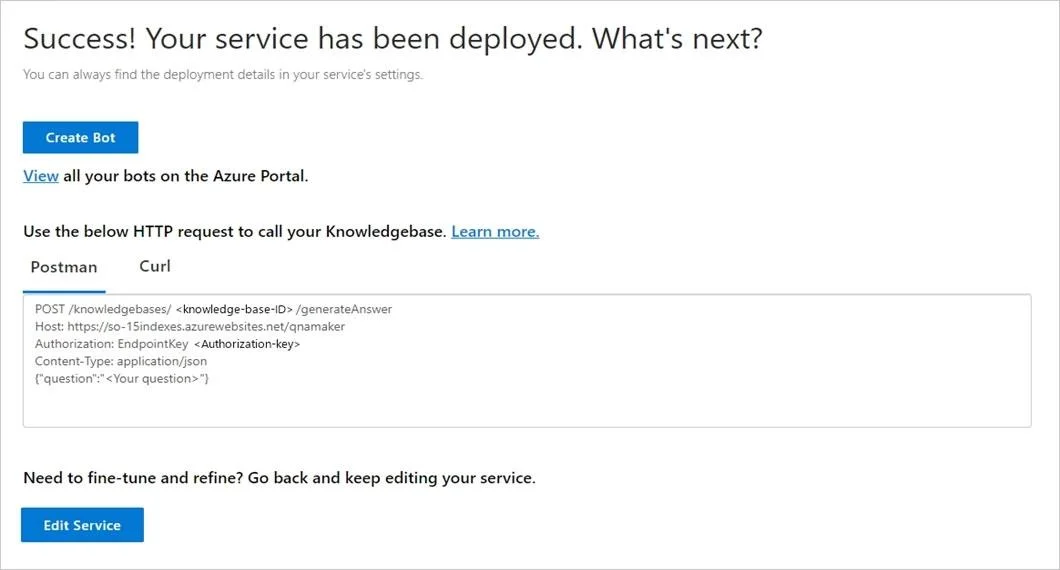
The correct interaction is to select the 'Create Bot' button to initiate the creation of an Azure Bot Service linked to the published QnA Maker knowledge base, as specified by the exam steps.
Question
Exhibit
Explanation
The correct interaction is to select the 'Create Bot' button to initiate the creation of an Azure Bot Service linked to the published QnA Maker knowledge base, as specified by the exam steps.
Approach. The exam question's Step 3 explicitly states: 'In the QnA Maker portal, on the Publish page, select Create bot. This button appears only after you've published the knowledge base.' The exhibit image shows the state immediately after publishing the knowledge base, presenting the 'Create Bot' button. Clicking this button aligns directly with the instructions, taking the user to the Azure portal to configure and create the Azure Bot Service, pre-configured to use the deployed QnA Maker knowledge base. This is the intended and most direct workflow for integrating QnA Maker with an Azure Bot as per the scenario.
Common mistakes.
- common_mistake. A common mistake would be to select 'Edit Service'. This button would take the user back to modify the content of the QnA Maker knowledge base, which is not the current task. Another mistake might be to ignore the prompt and attempt to create an Azure Bot Service manually from the Azure portal. While technically possible, it bypasses the integrated workflow provided by QnA Maker and doesn't follow the specific steps given in the lab instructions, which guide the user to leverage the 'Create Bot' button for streamlined integration. Interacting with the HTTP request details (Postman/Curl sections) would also be incorrect, as these are for API consumption, not for bot creation.
Concept tested. The core technical concept being tested is the integration and deployment workflow between Azure QnA Maker and Azure Bot Service. Specifically, it assesses the ability to leverage the direct 'Create Bot' functionality within the QnA Maker portal after publishing a knowledge base, streamlining the creation of a bot that utilizes the published QnA Maker service. It also tests the understanding of the stages of bot development and deployment, from knowledge base creation to bot service instantiation.
Topics
Community Discussion
No community discussion yet for this question.