
Microsoft
AI-102 · Question #202
SIMULATION Use the following login credentials as needed: - To enter your username, place your cursor in the Sign in box and click on the username below. - To enter your password, place your cursor…
The initial step to create an Azure AI Search index and populate it from a sample database is to use the 'Import data' wizard in the Azure portal.
Submitted by jian89· Mar 30, 2026Implement knowledge mining solutions
Question
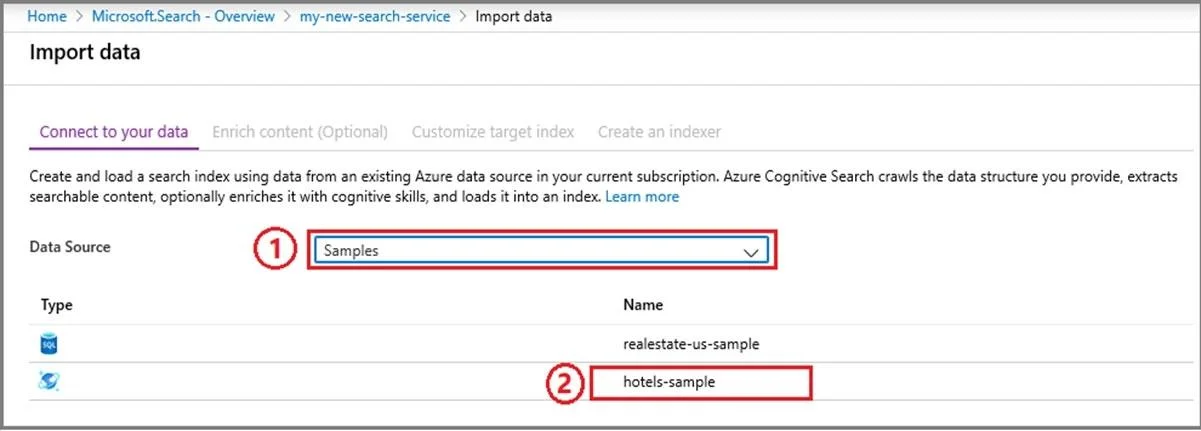
SIMULATION Use the following login credentials as needed: - To enter your username, place your cursor in the Sign in box and click on the username below. - To enter your password, place your cursor in the Enter password box and click on the password below. Azure Username: [email protected] Azure Password: XXXXXXXXXXXX The following information is for technical support purposes only: - Lab Instance: 12345678 Task You need to create an Azure resource named solution12345678 that will index a sample database named realestate-us-sample. The solution must ensure that users can search the index in English for people, organizations, and locations. To complete this task, sign in to the Azure portal. Answer: Step 1 - Start the Import data wizard and create a data source 1. Sign in to the Azure portal with your Azure account. 2. Find your search service and on the Overview page, click Import data on the command bar to create and populate a search index. 3. In the wizard, click Connect to your data, and select the sample database named realestate-us-sample Step 2 - Skip the "Enrich content" page The wizard supports the creation of an AI enrichment pipeline for incorporating the Cognitive Services AI algorithms into indexing. We'll skip this step for now, and move directly on to Customize target index. Step 3 - Configure index The solution must ensure that users can search the index in English for people, organizations, and locations. Configure Searchable for the fields people, organizations, and locations. Reference: https://docs.microsoft.com/en-us/azure/search/search-get-started-portal
Exhibit
Explanation
The initial step to create an Azure AI Search index and populate it from a sample database is to use the 'Import data' wizard in the Azure portal.
Concept tested. Azure AI Search data import and indexer creation
Reference. https://learn.microsoft.com/en-us/azure/search/search-get-started-portal
Topics
#Azure AI Search#Search Indexers#Cognitive Skillsets#Named Entity Recognition
Community Discussion
No community discussion yet for this question.