
AI-102 · Question #201
SIMULATION Use the following login credentials as needed: - To enter your username, place your cursor in the Sign in box and click on the username below. - To enter your password, place your cursor…
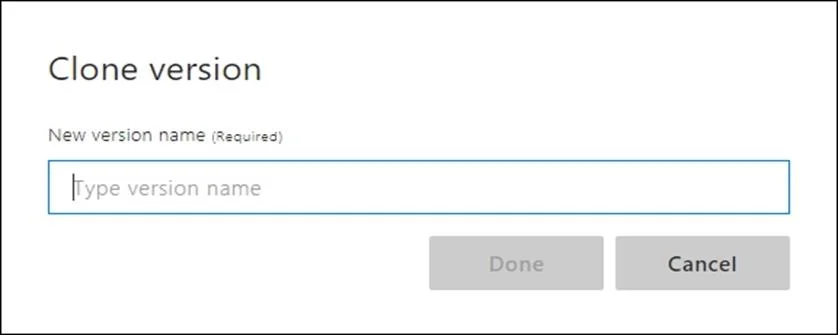
The task requires cloning a LUIS model version and naming the new version '1.0' by typing it into the provided text box and confirming with the 'Done' button.
Question
Exhibit
Explanation
The task requires cloning a LUIS model version and naming the new version '1.0' by typing it into the provided text box and confirming with the 'Done' button.
Approach. The task specifies that a new version of the Language Understanding (classic) model must be created with the version name '1.0'. The exhibit image shows the 'Clone version' dialog box, which is the exact interface presented after initiating the cloning process. To fulfill the requirement, the test-taker must first type '1.0' into the text box labeled 'New version name (Required)'. After entering the correct version name, the test-taker must then click the 'Done' button to confirm the creation of the cloned version with the specified name. This action completes the 'Step 1: Clone a version' part of the task according to the instructions provided in the question.
Common mistakes.
- common_mistake. A common mistake would be to type an incorrect version name, such as '1u12345678' (the original model's name) or 'new_version' instead of the specified '1.0'. Typing nothing and clicking 'Done' would likely result in a validation error, as the field is marked 'Required'. Another mistake would be clicking 'Cancel' after typing the correct name, which would discard the changes and not create the new version. Failing to click 'Done' after typing the correct name would also result in the task not being completed, as the dialog box would remain open and the version would not be cloned.
Concept tested. The core concept being tested is the ability to manage versions of Language Understanding (LUIS) applications, specifically cloning an existing model version and assigning it a new, specified name. This includes understanding the user interface flow for version management within the LUIS portal (or a similar Azure Cognitive Services portal).
Reference. https://docs.microsoft.com/en-us/azure/cognitive-services/luis/luis-how-to-manage-versions
Topics
Community Discussion
No community discussion yet for this question.