
AB-730 · Question #69
You sign in to the Microsoft 365 Copilot app by using your work account as shown in the following exhibit. A colleague tells you that when they open the Microsoft 365 Copilot app, they have access…
The correct answer is A. Request a Microsoft 365 Copilot license from an administrator. In the Microsoft 365 Copilot app, the Researcher agent is a specialized "reasoning agent" designed for deep, multi-step analysis rather than quick chat responses. How to Access Researcher 1. Open the App: Sign into the Microsoft 365 Copilot app or open it from your Windows…
Question
You sign in to the Microsoft 365 Copilot app by using your work account as shown in the following exhibit. A colleague tells you that when they open the Microsoft 365 Copilot app, they have access to the Researcher agent. You need to access to the Researcher agent. What should you do?
Exhibit
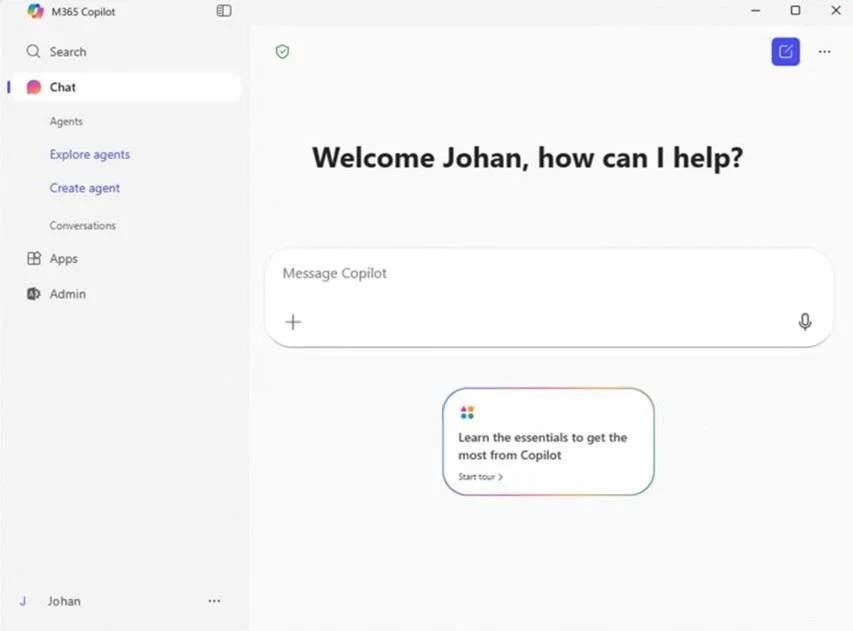
Options
- ARequest a Microsoft 365 Copilot license from an administrator.
- BSelect Explore agents and then search for Researcher.
- CSign in to the Copilot app by using a personal account.
- DFrom Microsoft Edge, use your work account to sign in to https://copilot.microsoft.com.
How the community answered
(50 responses)- A76% (38)
- B14% (7)
- C8% (4)
- D2% (1)
Explanation
In the Microsoft 365 Copilot app, the Researcher agent is a specialized "reasoning agent" designed for deep, multi-step analysis rather than quick chat responses. How to Access Researcher 1. Open the App: Sign into the Microsoft 365 Copilot app or open it from your Windows taskbar. 2. Locate Agents: In the left-hand navigation pane, look for the Agents section. 3. Select Researcher: 3a. If it is already listed, simply click Researcher to open the dedicated interface. [It is not listed 3b. If you don't see it, click All agents to open the Agent Store, then search for "Researcher" under the "Built by Microsoft" or "Productivity" categories. 4. Pin for Easy Access: Hover over the Researcher agent in the list, select the More (...) menu, and choose to pin it so it stays visible in your sidebar. Requirements for Access *-> License: You must have a Microsoft 365 Copilot license. It is available for Business, Enterprise, and Premium subscribers. Admin Enablement: If you still cannot find the agent, your IT administrator may need to enable it. They can do this in the Microsoft 365 admin center by navigating to Copilot > Settings > Data access > Agents and ensuring access is set to "All Users" https://support.microsoft.com/en-us/topic/get-started-with-researcher-in-microsoft-365-copilot- e63ab760-f3de-4c47-ae87-dad601b0e9c4
Topics
Community Discussion
No community discussion yet for this question.