
800-150 · Question #75
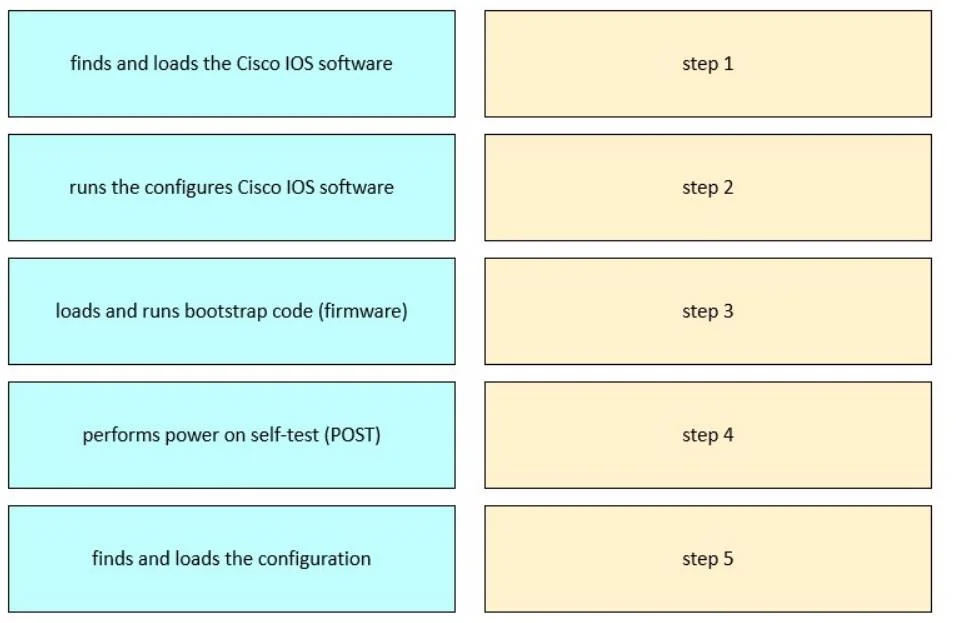
Drag and Drop Question Drag and drop the steps of the boot sequence process of a Cisco device into order on the right. Answer:
The correct answer is performs power on self-test (POST); loads and runs bootstrap code (firmware); finds and loads the Cisco IOS software; finds and loads the configuration; runs the configures Cisco IOS software. Cisco Device Boot Sequence Explained The boot process follows a strict dependency chain - each step creates the conditions required for the next. Here's why each item lands where it does. --- 1. Performs Power-On Self-Test (POST) Why first: Hardware must be verified before any…
Question
Drag and Drop Question Drag and drop the steps of the boot sequence process of a Cisco device into order on the right. Answer:
Exhibit
Answer Area
Drag items
Correct arrangement
- performs power on self-test (POST)
- loads and runs bootstrap code (firmware)
- finds and loads the Cisco IOS software
- finds and loads the configuration
- runs the configures Cisco IOS software
Explanation
Cisco Device Boot Sequence Explained
The boot process follows a strict dependency chain - each step creates the conditions required for the next. Here's why each item lands where it does.
1. Performs Power-On Self-Test (POST)
Why first: Hardware must be verified before any software runs. POST is burned into ROM and runs automatically the moment power is applied. It checks the CPU, memory (RAM), and interfaces. If hardware is faulty, there's no point loading software. Nothing else can proceed until POST passes.
2. Loads and Runs Bootstrap Code (Firmware)
Why second: After POST confirms hardware is functional, the bootstrap program (also stored in ROM) initializes the CPU and locates where to find the IOS image. Think of it as the BIOS/UEFI equivalent - a minimal loader whose only job is to find and hand off to the real OS. It has no networking capability on its own; it's purely a locator.
3. Finds and Loads the Cisco IOS Software
Why third: The bootstrap code searches Flash memory (or a TFTP server) for a valid IOS image using the boot field in the configuration register. IOS is the full operating system - without it loaded into RAM, the device has no commands, no protocols, no capabilities.
4. Finds and Loads the Configuration
Why fourth: IOS must be running before it can interpret a configuration file. Once IOS is active, it searches NVRAM for the startup-config. If none is found, it launches the setup wizard. Configuration is meaningless without an OS to apply it to.
5. Runs the Configured Cisco IOS Software
Why last: Only after the config is loaded and applied does the device become fully operational - interfaces come up, routing protocols start, VLANs activate. This is the device entering its steady-state running mode.
Common Mistakes & Misconceptions
| Mistake | Reality |
|---|---|
| Swapping POST and bootstrap | POST comes first - bootstrap depends on POST confirming usable hardware |
| Thinking IOS loads before bootstrap | Bootstrap is the finder - IOS can't load itself |
| Placing config before IOS | IOS must parse the config; config loading is meaningless without the OS |
| Confusing "finds config" vs "runs IOS" | Loading config and applying it are the same event; "runs configured IOS" means the OS is now operational with all config applied |
Key mental model: Hardware → Firmware → OS → Config → Running. It's the same dependency order as any computer: verify hardware, then boot loader, then OS, then user settings, then full operation.
Topics
Community Discussion
No community discussion yet for this question.