
Avaya
72300X · Question #80
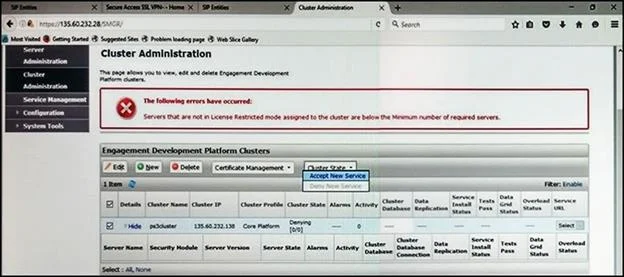
Refer to the exhibit. In the Cluster Administration screen of a PresenceServices cluster, when you try to change the cluster state to Accept New Service, you receive the error: Servers that are not…
The correct answer is B. Under Avaya Breeze > Server Administration, select the server and change the System State. See the full explanation below for the reasoning.
Question
Refer to the exhibit. In the Cluster Administration screen of a PresenceServices cluster, when you try to change the cluster state to Accept New Service, you receive the error: Servers that are not in License Restricted mode assigned to the cluster are below the Minimum number of required servers. You check that a server has been administered under Breeze > Server Administration which shows green check under License Mode, and a System State of Denying. Which action needs to be taken to solve this problem?
Exhibit
Options
- AEdit the Cluster, access the Servers tab, and assign the server to the cluster; then set the
- BUnder Avaya Breeze > Server Administration, select the server and change the System State
- CObtain and install an Avaya BreezeTM license on webLM with more instances of Avaya
- DEdit the cluster to change the cluster profile from Core Platform to General Purpose.
How the community answered
(49 responses)- A6% (3)
- B84% (41)
- C8% (4)
- D2% (1)
Community Discussion
No community discussion yet for this question.