
Microsoft
70-779 · Question #51
You create a PivotTable and a Pivot Chart as shown in the following exhibit. You need to decrease the number of columns in the PivotChart to six. What should you do?
Sign in or unlock 70-779 to reveal the answer and full explanation for question #51. The question stem and answer options stay visible for context.
Visualize data by using Microsoft Excel
Question
You create a PivotTable and a Pivot Chart as shown in the following exhibit. You need to decrease the number of columns in the PivotChart to six. What should you do?
Exhibit
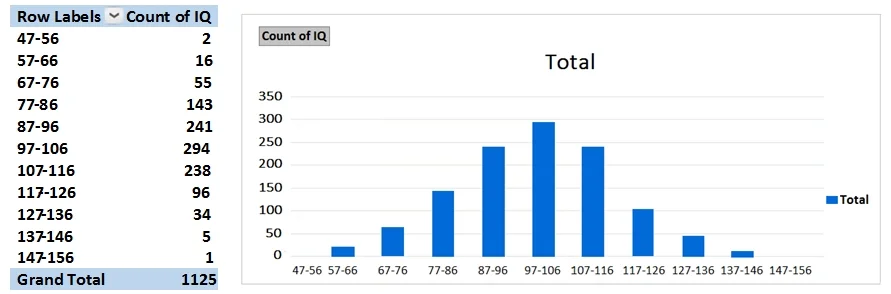
Options
- ARight-click the PivotChart, click Format Axis, and then change Interval between marks to 2.
- BRight-click the PivotTable, click Group, and then change By from 10 to 20.
- CRight-click the PivotChart, click Select Data, and then remove five of the bins from the Horizontal
- DChange the chart type to Histogram.
Unlock 70-779 to see the answer
You've previewed enough free 70-779 questions. Unlock 70-779 for full answers, explanations, the timed quiz mode, progress tracking, and the master PDF. Question stem and options stay visible so you can still see what's on the exam.
Topics
#PivotChart#histogram#bins#chart formatting