
70-698 · Question #8
You have a computer named Computer1 that runs Windows 10. On Computer1, C:\Folder1 has the permissions configured as shown in the following table. You share C:\Fotder1 as Folder1 and you grant…
The correct answer is B. User1 can see the Folder1 share on the network and can connect to Folder1. Accessing a shared folder requires both share permissions and NTFS permissions to allow access; the effective permission is the most restrictive intersection of the two. User1 satisfies both layers here.
Question
You have a computer named Computer1 that runs Windows 10. On Computer1, C:\Folder1 has the permissions configured as shown in the following table. You share C:\Fotder1 as Folder1 and you grant access to the Everyone group. Folder1 has the following share settings. What level of access does User1 have to Folder1?
Exhibit
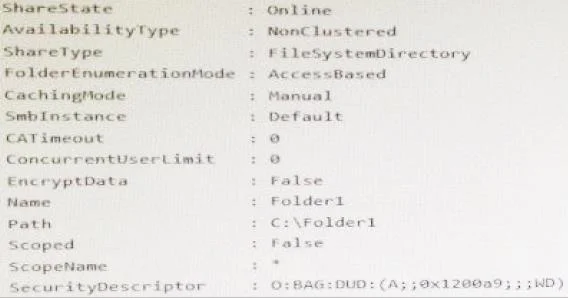
Options
- AUser1 cannot see the Folder1 share on the network and cannot connect to Folder1.
- BUser1 can see the Folder1 share on the network and can connect to Folder1.
- CUser1 cannot see the Folder1 share on the network but can connect to Folder1.
- DUser1 can see the Folder1 share on the network but cannot connect to Folder1.
How the community answered
(50 responses)- A14% (7)
- B56% (28)
- C6% (3)
- D24% (12)
Why each option
Accessing a shared folder requires both share permissions and NTFS permissions to allow access; the effective permission is the most restrictive intersection of the two. User1 satisfies both layers here.
This would only be correct if User1 lacked permissions at both the share and NTFS layers, or if access-based enumeration was hiding the share, neither of which is the case here.
The share grants the Everyone group access, which includes User1, and the NTFS permissions on C:\Folder1 also permit User1 access. Because both the share permission and the NTFS permission allow access, the combined effective permission is Allow, so User1 can see the share on the network and connect to it.
A user cannot connect to a share they cannot see without manually entering the UNC path; the configured permissions do not set up that split scenario.
This scenario would require share permissions to allow visibility but NTFS to deny access, which contradicts the permissions shown in the question.
Concept tested: Combining NTFS and share permissions for effective access
Source: https://learn.microsoft.com/en-us/windows-server/storage/file-server/best-practices-analyzer/sharing-and-access-should-be-configured-to-grant-the-minimum-necessary-permissions
Topics
Community Discussion
No community discussion yet for this question.