
70-698 · Question #4
You have a computer named Computer1. A user named User1 is a member of two groups named Group1 and Group2. You have a file named Doc1.docx that is located in E:\Data. The file permissions for…
The correct answer is B. Remove User1 from Group2 and instruct the user to sign out, and then sign back in. This question tests understanding of NTFS permission precedence. Although the exhibit is not shown, the scenario implies that Group2 has an explicit 'Deny' permission on Doc1.docx. In Windows NTFS, an explicit Deny permission always overrides any Allow permission, regardless of…
Question
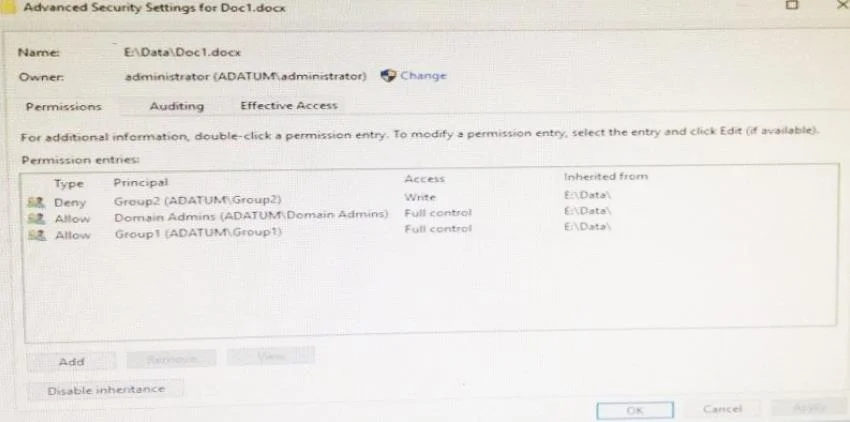
You have a computer named Computer1. A user named User1 is a member of two groups named Group1 and Group2. You have a file named Doc1.docx that is located in E:\Data. The file permissions for E:\Data\Doc1.docx are configured as shown in the exhibit. (Click the Exhibit button.) You need to provide User1 with Write access to Doc1.docx. What should you do?
Exhibit
Options
- AGrant User1 Full control access to folder E:\Data.
- BRemove User1 from Group2 and instruct the user to sign out, and then sign back in.
- CGrant User1 Full control access to the E:\Data\Doc1.docx file, disable inheritance for the file, and
- DGrant User1 Write access to folder E.
How the community answered
(49 responses)- A14% (7)
- B49% (24)
- C31% (15)
- D6% (3)
Explanation
This question tests understanding of NTFS permission precedence. Although the exhibit is not shown, the scenario implies that Group2 has an explicit 'Deny' permission on Doc1.docx. In Windows NTFS, an explicit Deny permission always overrides any Allow permission, regardless of whether the Allow comes from a direct assignment or group membership. So even if User1 has Write access through Group1 or directly, the Deny from Group2 blocks it. Option B is the correct fix: removing User1 from Group2 eliminates the Deny entry from User1's effective permissions. The sign-out and sign-back-in step is required because Windows caches group membership in the user's security access token at logon - changes to group membership do not take effect until the token is refreshed. Options A and D would not help because a Deny on the file itself overrides permissions granted at the folder level. Option C (grant Full Control and disable inheritance) could technically work but is unnecessarily complex compared to simply removing the Deny source.
Topics
Community Discussion
No community discussion yet for this question.