
Microsoft
70-667 · Question #154
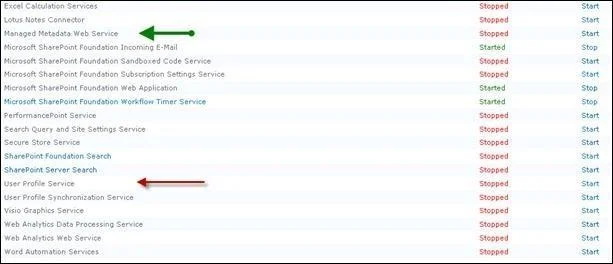
Steps to enable the User Profile Service
The correct answer is C. Go to Central Administration, in the System Settings click on Manage services on server. In this procedure, you start the User Profile Synchronization service. The User Profile Synchronization service interacts with Microsoft Forefront Identity Manager (FIM) to synchronize information with external systems
Managing User Profiles and Social Computing
Question
Steps to enable the User Profile Service
Exhibit
Options
- AGo to Central Administrator, in System Settings click Manage Services on server.
- BUse PowerShell Cmdlet Install - SPUser - Identity MySharePointUser - LiteralPath - GacDeployment
- CGo to Central Administration, in the System Settings click on Manage services on server.
- DGo to Central Administrator, click on System Settings.
How the community answered
(32 responses)- A3% (1)
- B13% (4)
- C81% (26)
- D3% (1)
Explanation
In this procedure, you start the User Profile Synchronization service. The User Profile Synchronization service interacts with Microsoft Forefront Identity Manager (FIM) to synchronize information with external systems
Topics
#User Profile Service#Central Administration#Manage Services#service configuration
Community Discussion
No community discussion yet for this question.