
Microsoft
70-667 · Question #155
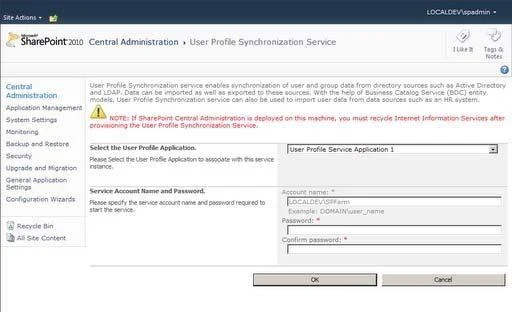
Enable The User Profile Synchronization Service
The correct answer is C. Go to Central Administrator, in System Settings click Manage Services on server. In this procedure, you start the User Profile Synchronization service. The User Profile Synchronization service interacts with Microsoft Forefront Identity Manager (FIM) to synchronize information with external systems.
Managing User Profiles and Social Computing
Question
Enable The User Profile Synchronization Service
Exhibit
Options
- AGo to Central Administration, in the System Settings click on Manage services on server. On Services on
- BGo to Central Administrator, click on System Settings.
- CGo to Central Administrator, in System Settings click Manage Services on server.
- DUse PowerShell Cmdlet Install - SPUser - Identity MySharePointUser - LiteralPath - GacDeployment
How the community answered
(33 responses)- A9% (3)
- B15% (5)
- C73% (24)
- D3% (1)
Explanation
In this procedure, you start the User Profile Synchronization service. The User Profile Synchronization service interacts with Microsoft Forefront Identity Manager (FIM) to synchronize information with external systems.
Topics
#User Profile Synchronization#Central Administration#Manage Services#service configuration
Community Discussion
No community discussion yet for this question.