
Microsoft
70-667 · Question #152
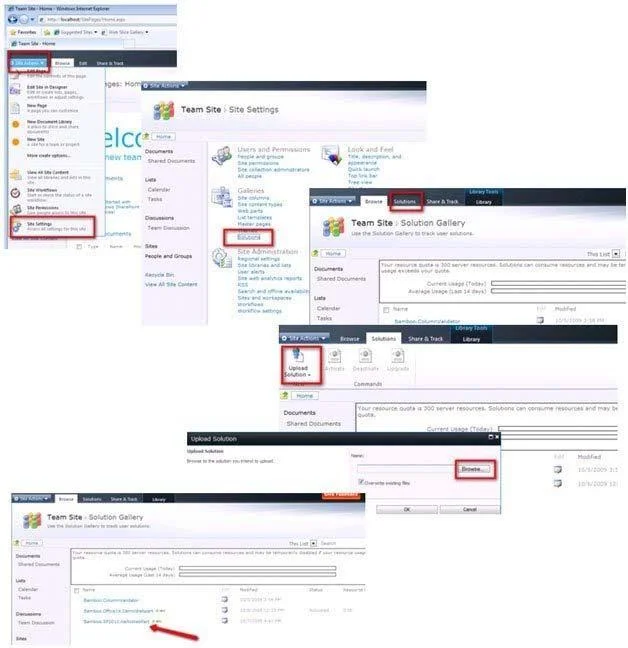
Steps to add and deploy a solution to a site
The correct answer is B. From Central Administration go to System Settings then to Farm Management then to Manage Farm solutions. Deploying to a Farm you use PowerShell and when you are deploying to a site use Central Admin. It was explained to me that deploying to a Farm has a greater chance of messing things up so it like a double check, requiring Admin rights.
Deploying SharePoint 2010
Question
Steps to add and deploy a solution to a site
Exhibit
Options
- AUse PowerShell Cmdlet Add-SPSolution -LiteralPath
- BFrom Central Administration go to System Settings then to Farm Management then to Manage Farm solutions.
- CUse PowerShell Cmdlet Update-SPSolution -Identity MySharePointSolution.wsp LiteralPath "C:
- DUse Stsadm Command stsadm -o deploysolution -name MySharePointSolutionPackage.wsp
How the community answered
(26 responses)- A12% (3)
- B77% (20)
- C8% (2)
- D4% (1)
Explanation
Deploying to a Farm you use PowerShell and when you are deploying to a site use Central Admin. It was explained to me that deploying to a Farm has a greater chance of messing things up so it like a double check, requiring Admin rights.
Topics
#farm solutions#Central Administration#solution deployment#Farm Management
Community Discussion
No community discussion yet for this question.