
70-663 · Question #83
You have an Exchange Server 2003 organization. You plan to transition the organization to Exchange Server 2010. You need to recommend a plan that allows the Exchange Server 2003 servers to coexist…
The correct answer is D. Use only Exchange Server 2010 Hub Transport servers for the expansion of distribution. Distribution groups are mail-enabled Active Directory group objects that are created to expedite the mass sending of e-mail messages and other information within an Exchange organization. For each message that is sent to a distribution group, Exchange must access the full…
Question
You have an Exchange Server 2003 organization. You plan to transition the organization to Exchange Server 2010. You need to recommend a plan that allows the Exchange Server 2003 servers to coexist with Exchange Server 2010 servers. The plan must meet the following requirements:
- Support journaling of e-mail messages that are sent to distribution
lists from a mailbox on an Exchange Server 2003 server
- Support journaling of e-mail messages that are sent to distribution
lists from a mailbox on an Exchange Server 2010 server What should you recommend?
Exhibit
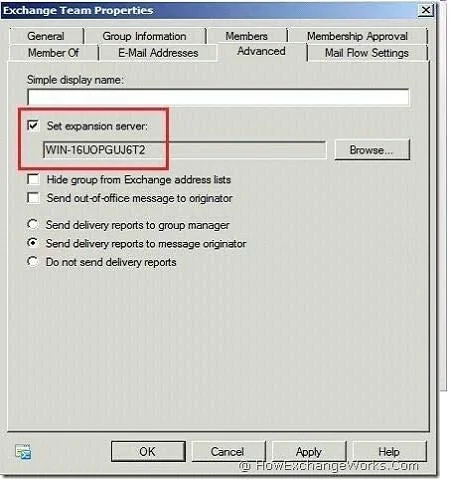
Options
- AImplement Personal Archives.
- BImplement Universal Group Membership Caching.
- CUse only Exchange Server 2003 servers for the expansion of distribution groups.
- DUse only Exchange Server 2010 Hub Transport servers for the expansion of distribution
How the community answered
(42 responses)- A17% (7)
- B5% (2)
- C5% (2)
- D74% (31)
Explanation
Distribution groups are mail-enabled Active Directory group objects that are created to expedite the mass sending of e-mail messages and other information within an Exchange organization. For each message that is sent to a distribution group, Exchange must access the full membership list to route the message to all recipients. This process is known as distribution group expansion. Expansion of very large distribution groups is a resource intensive process. If it occurs on a production server, it may impact mail flow. To avoid any production impact, you may want to specify expansion servers for very large distribution groups. Set expansion server Use this box and corresponding Browse button to select a Hub Transport server in your Exchange organization that will be responsible for expanding the membership list for this distribution group. Setting is set through the property of the Distribution group. Go to the properties of the selected group and navigate to "Advanced" tab. Check the option "Set Expansion Server" and select a
Topics
Community Discussion
No community discussion yet for this question.