
70-663 · Question #17
You have an Exchange organization that consists of the servers shown in the following table. You plan to implement moderated transport for distribution groups in the organization. You need to…
The correct answer is D. Use Server4 as the expansion server for all moderated distribution groups. Using the moderated transport feature in Microsoft Exchange Server 2010, you can require all e- mail messages sent to specific recipients be approved by moderators. Exchange 2010 Hub Transport servers will ensure that all messages sent to those recipients go through an approval…
Question
You have an Exchange organization that consists of the servers shown in the following table. You plan to implement moderated transport for distribution groups in the organization. You need to recommend changes to the organization to support the planned implementation. What should you recommend?
Exhibit
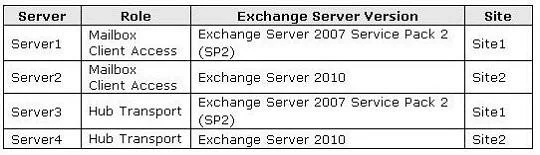
Options
- AUpgrade Server 3 to Exchange Server 2010.
- BInstall Windows Server 2008 R2 global catalog servers.
- CReplace all distribution groups with dynamic distribution groups.
- DUse Server4 as the expansion server for all moderated distribution groups.
How the community answered
(62 responses)- A16% (10)
- B8% (5)
- C5% (3)
- D71% (44)
Explanation
Using the moderated transport feature in Microsoft Exchange Server 2010, you can require all e- mail messages sent to specific recipients be approved by moderators. Exchange 2010 Hub Transport servers will ensure that all messages sent to those recipients go through an approval process. Moderation must be done on a Exchange 2010 Hub Transport Server [as this is a new feature in 2010]. Before you make heavy use of moderated distribution lists, you should make sure that the message doesn't have to pass through any non-Exchange 2010 Hub Transport servers. Older Hub Transport servers will simply pass messages on to group members and ignore moderation You enable moderation features on an existing distribution group. Go to groups Properties, then Mail Flow Settings, then Message Moderation.
Topics
Community Discussion
No community discussion yet for this question.