
70-663 · Question #164
Contoso, Ltd. has an Exchange Server 2010 environment that accepts email for the contoso.com email domain. Fabrikam, Inc. has an Exchange Server 2010 environment that accepts mail for the…
The correct answer is A. Create an internal relay accepted domain for contoso.com. D. Create an internal send connector. You need to create an internal relay accepted domain and a send connector to relay to the fabrikam servers Internal Relay Domain When you configure an internal relay domain, some or all of the recipients in this domain don't have mailboxes in this Exchange organization. Mail…
Question
Contoso, Ltd. has an Exchange Server 2010 environment that accepts email for the contoso.com email domain. Fabrikam, Inc. has an Exchange Server 2010 environment that accepts mail for the fabrikam.com email domain. Contoso acquires Fabrikam and establishes an internal network connection between the two companies. After the acquisition, only the Contoso Exchange Server environment accepts external email. You have the following requirements:
- Retain existing fabrikam.com email addresses.
- Enable users in both Exchange Server environments to receive mail at
contoso.com email addresses. You need to recommend a solution that meets the requirements. Which two actions should you recommend? (Each correct answer presents part of the solution. Choose two.)
Exhibit
Options
- ACreate an internal relay accepted domain for contoso.com.
- BCreate an external relay accepted domain for contoso.com.
- CCreate an internal receive connector.
- DCreate an internal send connector.
How the community answered
(20 responses)- A80% (16)
- B15% (3)
- C5% (1)
Explanation
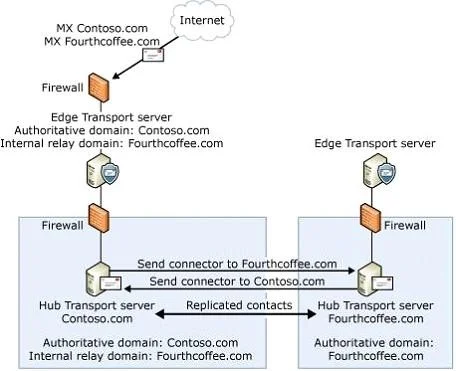
You need to create an internal relay accepted domain and a send connector to relay to the fabrikam servers Internal Relay Domain When you configure an internal relay domain, some or all of the recipients in this domain don't have mailboxes in this Exchange organization. Mail from the Internet is relayed for this domain through Hub Transport servers in this Exchange organization. This configuration is used in the scenarios that are described in this section. In the following figure, Fourthcoffee.com is configured as an internal relay domain for the Exchange 2010 organization in the Contoso.com forest. The MX resource records for Fourthcoffee.com reference a public IP address for the Contoso.com organization. A forest trust exists between Fourthcoffee.com and Contoso.com, and GAL synchronization is configured. The Contoso.com Edge Transport server accepts messages for the Fourthcoffee.com SMTP domain from the Internet and then relays those messages to the Hub Transport servers in the Contoso.com Exchange organization. The messages are then routed to the Hub Transport servers in the Fourthcoffee.com Exchange organization. A cross-forest Send connector is configured for routing messages from Contoso.com to Fourthcoffee.com. Messages that are sent from Fourthcoffee.com to external recipients are routed to the Hub Transport servers in the Contoso.com forest. A second cross-forest Send connector is configured for routing messages from Fourthcoffee.com to Contoso.com. When the Hub Transport servers in Contoso.com receive messages from the internal relay domain Fourthcoffee.com, they deliver messages for recipients in authoritative domains and relay messages for Internet recipients to the Edge Transport server
Topics
Community Discussion
No community discussion yet for this question.