
70-663 · Question #127
A corporate environment includes a main office and a branch office. The company plans to deploy Exchange Server 2010. The Mailbox servers will be part of a single database availability group (DAG)…
The correct answer is A. Create a single public folder database in the branch office and add it as a replica for the C. Create a single public folder database in the main office and add it as a replica for the public. Public Folder replication will be required so a copy exists in both locations. During periods of inactive connectivity between the sites the databases will still be accessible. When the sties come back online the data will replicate and update the copies in either site. After…
Question
A corporate environment includes a main office and a branch office. The company plans to deploy Exchange Server 2010. The Mailbox servers will be part of a single database availability group (DAG) that spans both locations. There is only intermittent connectivity between the two locations. You need to recommend a public folder database solution that enables users from either location to consistently access public folders. Which two actions should you recommend? (Each correct answer presents part of the solution. Choose two.)
Exhibit
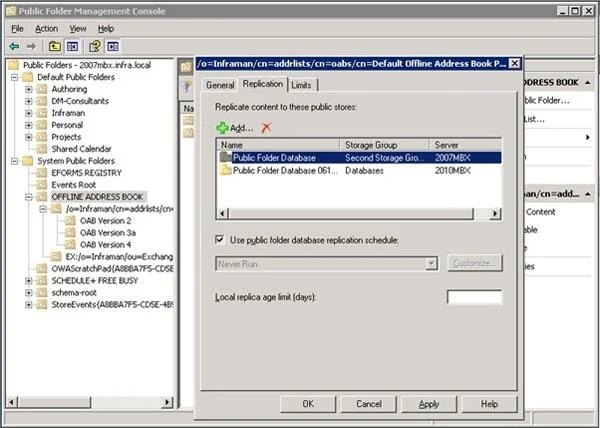
Options
- ACreate a single public folder database in the branch office and add it as a replica for the
- BConfigure public folder referrals between the main office and the branch office.
- CCreate a single public folder database in the main office and add it as a replica for the public
- DConfigure cross-site RPC Client Access on the DAG.
How the community answered
(30 responses)- A83% (25)
- B13% (4)
- D3% (1)
Explanation
Public Folder replication will be required so a copy exists in both locations. During periods of inactive connectivity between the sites the databases will still be accessible. When the sties come back online the data will replicate and update the copies in either site. After you determine which public folders you want to replicate and the databases on which they will be replicated, you can set the public folder database replication schedule. By default, public folder replication is scheduled to run every 15 minutes. You can select precanned replication intervals, or you can create a custom schedule. Set-PublicFolder "\My Public Folder" -UseDatabaseReplicationSchedule: $False -Replicas "Server02\PFDatabase02","Server03\PFDatabase03" Set-PublicFolderDatabase -Identity "Server01\PFDatabase" - ReplicationSchedule "Sun.12:01 AM-Sun.3:15 AM, Tue.12:00 AM-Tue.3:15 AM, Thu.12:00 AM-Thu.3:15 AM"
Topics
Community Discussion
No community discussion yet for this question.