
Microsoft
70-659 · Question #81
You create a virtual machine (VM) on a Windows Server 2008 R2 Hyper-V server. You plan to use this VM as the base image for new VMs. You need to ensure that you can import the base image multiple…
Sign in or unlock 70-659 to reveal the answer and full explanation for question #81. The question stem and answer options stay visible for context.
Configuring Hyper-V
Question
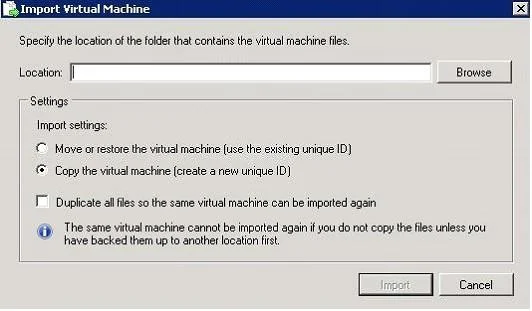
You create a virtual machine (VM) on a Windows Server 2008 R2 Hyper-V server. You plan to use this VM as the base image for new VMs. You need to ensure that you can import the base image multiple times on the original host server. In the Import Virtual Machine Wizard, which settings should you configure during each import process?
Exhibit
Options
- ASelect the Copy the virtual machine option and the Duplicate all files check box.
- BSelect the Copy the virtual machine option.
- CSelect the Move or restore the virtual machine option and the Duplicate all files check box.
- DSelect the Move or restore the virtual machine option.
Unlock 70-659 to see the answer
You've previewed enough free 70-659 questions. Unlock 70-659 for full answers, explanations, the timed quiz mode, progress tracking, and the master PDF. Question stem and options stay visible so you can still see what's on the exam.
Topics
#VM import#base image#duplicate files#Import Virtual Machine Wizard