70-659 · Question #117
Your environment includes a server that runs Windows Server 2008 R2 with the Hyper-V role installed. The server hosts several virtual machines (VMs). When you attempt to start a VM named VM1, you…
The correct answer is C. Reconnect the differencing disk. Using differencing disks A differencing disk is a virtual hard disk you use to isolate changes to a virtual hard disk or the guest operating system by storing them in a separate file. A differencing disk is similar to the Undo Disks feature because both offer a way to isolate…
Question
Your environment includes a server that runs Windows Server 2008 R2 with the Hyper-V role installed. The server hosts several virtual machines (VMs). When you attempt to start a VM named VM1, you receive the following error message:
The application encountered an error while attempting to change the state of 'VM1'. 'VM1' failed to start. Microsoft Emulated IDE Controller (Instance ID {83F8638B-8DCA-4152- 9EDA-2CA8B33039B4}): Failed to Power on with Error 'The chain of virtual hard disks is broken. The system cannot locate the parent virtual hard disk for the differencing disk.' Failed to open virtual disk 'V:\VM1\VM1.vhd'. A problem was encountered opening a virtual disk in the chain of differencing disks, 'IDE/ATAPI':
'The system cannot find the file specified.' Failed to open virtual disk 'V :\ VM1\VM1.vhd'. A problem was encountered opening a virtual disk in the chain of differencing disks, 'L :\ Base \W2K8R2EERCBASE+.vhd':
'The system cannot find the file specified.' You need to be able to start VM1. What should you do?
Exhibit
Options
- AMerge the differencing disk.
- BCompact the differencing disk.
- CReconnect the differencing disk.
- DConvert the parent virtual hard disk.
How the community answered
(29 responses)- A7% (2)
- B3% (1)
- C86% (25)
- D3% (1)
Explanation
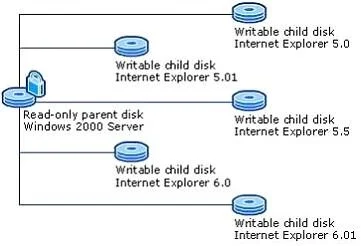
Using differencing disks A differencing disk is a virtual hard disk you use to isolate changes to a virtual hard disk or the guest operating system by storing them in a separate file. A differencing disk is similar to the Undo Disks feature because both offer a way to isolate changes in case you want to reverse them. However, Undo Disks is associated with a virtual machine and all disks assigned to it, while a differencing disk is associated only with one disk. In addition, Undo Disks is intended to be a shorter-term method of isolating changes. A differencing disk is associated with another virtual hard disk that you select when you create the differencing disk. This means that the disk to which you want to associate the differencing disk must exist first. This virtual hard disk is called the "parent" disk and the differencing disk is the "child" disk. The parent disk can be any type of virtual hard disk. The differencing disk stores all changes that would otherwise be made to the parent disk if the differencing disk was not being used. The differencing disk provides an ongoing way to save changes without altering the parent disk. You can use the differencing disk to store changes indefinitely, as long as there is enough space on the physical disk where the differencing disk is stored. The differencing disk expands dynamically as data is written to it and can grow as large as the maximum size allocated for the parent disk when the parent disk was created. You can find out which parent disk a differencing disk is related to by inspecting the differencing disk. Inspecting the parent disk does not identify any child disks that may be associated with it. To make it easier to identify relationships between disks, we recommend adopting a naming convention to support easy identification. Managing the contents of differencing disks You can distribute the contents that are stored in the differencing disk by merging the differencing disk. You can merge the changes to either the parent disk or a new virtual hard disk. Merging to the parent disk modifies the parent disk with all the changes stored in the differencing disk, and then deletes the differencing disk. Merging to a new virtual hard disk retains both the parent disk and the differencing disk in their current state, and creates a new virtual hard disk that is a combination of the parent disk contents and the differencing disk contents. You use the Administration Website to merge the changes. For instructions, seeMerge a virtual hard disk. Using multiple differencing disks with one parent disk You can associate more than one differencing disk to one parent, which means that virtual machines can share one parent disk but have their own differencing disk. This way of using differencing disks can be useful in a variety of scenarios. For example, a test engineer or call center technician could have a dozen or more virtual machines with different configurations, such as allocated memory or type of networking, with different software updates, and different installed applications. The virtual machines could share a parent disk that contains the operating system, and each virtual machine could have its own differencing disk to store the configuration that differs from the parent. The following figure shows an example in which each differencing disk stores a different version of Internet Explorer. You can chain differencing disks, which means that a differencing disk can have another differencing disk as a parent disk. Depending on how you design the chain, you can save considerable disk space. For example, if you want to test upgrade scenarios or version compatibility, you could use a parent disk as the base and a chain of differencing disks for the consecutive versions. This approach would save disk space if each differencing disk contained one update only. The following figure shows a chain of differencing disks being used to store operating system updates.
Topics
Community Discussion
No community discussion yet for this question.
