
70-497 · Question #70
Your team uses Microsoft Test Manager (MTM) to manage test cases. Your team organizes test cases so that the same test case can be associated with multiple test suites. You plan to create a test…
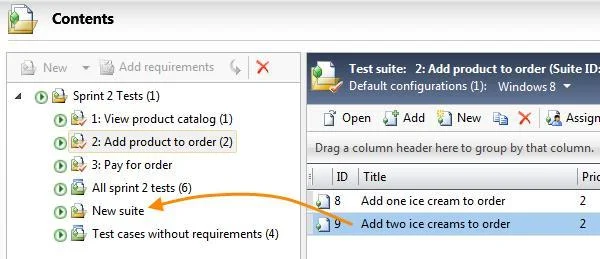
The correct answer is B. Create the test case inside Test Suite 1. C. Copy the test case from Test Suite 1, and paste it onto Test Suite 2. 1. Add a manual test case to your test plan. 2. Drag test cases from one suite to another, or cut and paste. CTRL CTRL + drag or copy and paste to make the same test case appear in more than one suite. These operations don't affect the test case itself. Suites contain links to…
Question
Your team uses Microsoft Test Manager (MTM) to manage test cases. Your team organizes test cases so that the same test case can be associated with multiple test suites. You plan to create a test case and associate it to two different static test suites named Test Suite 1 and Test Suite 2. You need to ensure that the test suites reference the same version of the new test case. Which two actions should you perform? Each correct answer presents part of the solution.
Exhibit
Options
- ADrag the test case from Test Suite 1 into Test Suite 2.
- BCreate the test case inside Test Suite 1.
- CCopy the test case from Test Suite 1, and paste it onto Test Suite 2.
- DRight-click on the test case, and select Create a copy and add to test suite.
How the community answered
(29 responses)- A7% (2)
- B79% (23)
- D14% (4)
Explanation
- Add a manual test case to your test plan. 2. Drag test cases from one suite to another, or cut and paste. CTRL CTRL + drag or copy and paste to make the same test case appear in more than one suite. These operations don't affect the test case itself. Suites contain links to test cases, and it's the links that you're moving or copying.
Topics
Community Discussion
No community discussion yet for this question.