
70-497 · Question #18
You are using Microsoft Test Manager (MTM). You are developing a test that requires a test step to verify a result against a known value. You plan to insert a new step to accomplish this task. You…
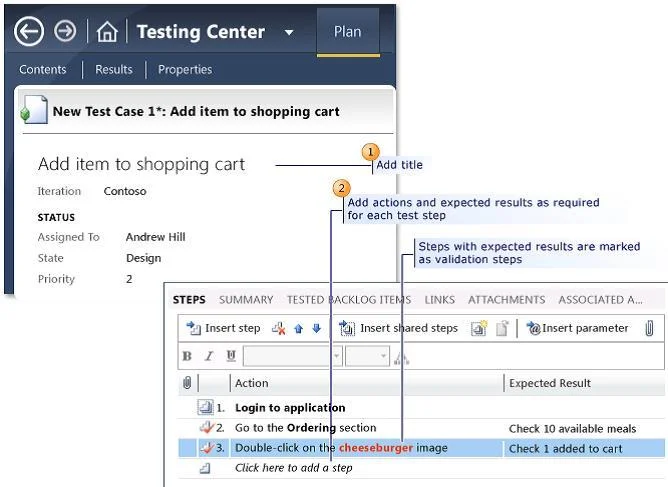
The correct answer is A. Type the expected value into the Expected Result column of the new test step. When you create manual test cases, you can add the action and expected result for each test step, as shown in the following illustration. When you run this test, you will be able to mark each test step as either passed or failed.
Question
You are using Microsoft Test Manager (MTM). You are developing a test that requires a test step to verify a result against a known value. You plan to insert a new step to accomplish this task. You need to make the new step a validation step. What should you do?
Exhibit
Options
- AType the expected value into the Expected Result column of the new test step.
- BType the expected value into the Action column of the new test step.
- CAdd the expected result value into the Parameter Values pane.
- DAdd a parameter to the Action column of the new test step.
How the community answered
(59 responses)- A71% (42)
- B8% (5)
- C3% (2)
- D17% (10)
Explanation
When you create manual test cases, you can add the action and expected result for each test step, as shown in the following illustration. When you run this test, you will be able to mark each test step as either passed or failed.
Topics
Community Discussion
No community discussion yet for this question.