
70-497 · Question #15
You are using Microsoft Test Manager (MTM). You are using the Microsoft Visual Studio Scrum 1.0 process template. Your client has added new capabilities to a product in development, which…
The correct answer is B. From the Links tab, link the requirements document to the PBI. D. For each test case, use the Tested Backlog Items tab to add a link to the PBI. Typically, you create a test plan for each iteration and area of your team project. Near the start of the iteration, you add the product backlog items, user stories or requirements of that iteration to the test plan. - In Microsoft Test Manager, choose Testing Center, Plan…
Question
You are using Microsoft Test Manager (MTM). You are using the Microsoft Visual Studio Scrum 1.0 process template. Your client has added new capabilities to a product in development, which necessitates a major change to existing test cases. The product owner has created a new product backlog item (PBI) and has provided you a link to a document that explains these new requirements. You need to provide easy access to the requirements document from the test cases. Which two actions should you perform? (Each correct answer presents part of the solution. Choose two.)
Exhibit
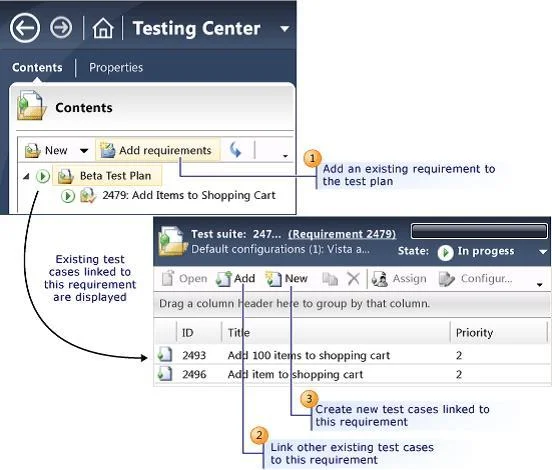
Options
- AFrom the Test Suite window, add the requirement document by using Add Requirements.
- BFrom the Links tab, link the requirements document to the PBI.
- CFrom the Test Plan Manager, add a link to the PBI.
- DFor each test case, use the Tested Backlog Items tab to add a link to the PBI.
How the community answered
(41 responses)- A15% (6)
- B78% (32)
- C7% (3)
Explanation
Typically, you create a test plan for each iteration and area of your team project. Near the start of the iteration, you add the product backlog items, user stories or requirements of that iteration to the test plan. - In Microsoft Test Manager, choose Testing Center, Plan, Contents. - Choose Add Requirements. - In Add existing requirements, edit the query to find the requirements For example, you might add a clause to select the current Iteration Path. Or, you might choose requirements that are not already linked to test cases. - Choose Run to run the query and display requirements. - Select the requirements you want to add. D: The Tested Backlog Items tab lists all the PBIs and bugs in a test case. By linking PBIs and bugs to test cases, the team can track the progress made in testing each Creating Tests for Product Backlog Items, User Stories, or Requirements
Topics
Community Discussion
No community discussion yet for this question.