
70-497 · Question #47
You are using Microsoft Test Manager (MTM) to run manual tests. Testers reported a bug during a test run on the V1.0 build. A build for V2.0 has been created. Testers are still running tests against…
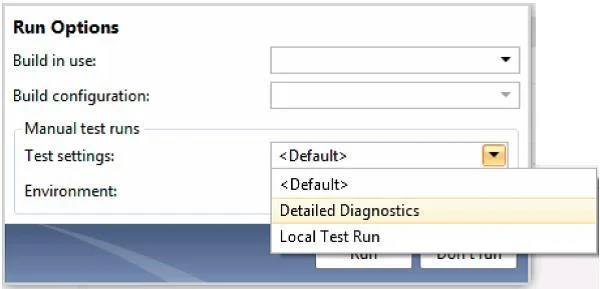
The correct answer is C. Change the build to V2.0 by using Run with options and run the test case. When we want to use the test settings we either assign it to the test plan or choose the test setting when we start a test run by selecting Run Options
Question
You are using Microsoft Test Manager (MTM) to run manual tests. Testers reported a bug during a test run on the V1.0 build. A build for V2.0 has been created. Testers are still running tests against the V1.0 build. You need to verify that the bug has been fixed in build V2.0. What should you do?
Exhibit
Options
- AChange the default build for the test plan to V2.0 and run the test case.
- BRun the test case with default settings; the latest build will be selected automatically.
- CChange the build to V2.0 by using Run with options and run the test case.
- DChange the build property for the test case to the V2.0 build and run the test case.
How the community answered
(59 responses)- A7% (4)
- B3% (2)
- C80% (47)
- D10% (6)
Explanation
When we want to use the test settings we either assign it to the test plan or choose the test setting when we start a test run by selecting Run Options
Topics
Community Discussion
No community discussion yet for this question.