
Microsoft
70-497 · Question #25
You are using Microsoft Test Manager (MTM) for manual test runs. You are creating an action recording but some of the recorded actions were not part of the intended steps. You need to remove only…
Sign in or unlock 70-497 to reveal the answer and full explanation for question #25. The question stem and answer options stay visible for context.
Implement and manage test execution
Question
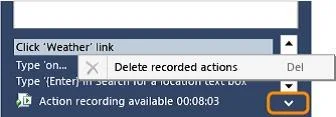
You are using Microsoft Test Manager (MTM) for manual test runs. You are creating an action recording but some of the recorded actions were not part of the intended steps. You need to remove only the unwanted actions from the current action recording. What should you do?
Exhibit
Options
- AOpen the test results and save the action log.
- BReset the test case inside the test runner and create a new action log.
- CDelete the unwanted actions from the captured actions inside the test runner.
- DOpen the test results and edit the action log to remove the unwanted actions.
Unlock 70-497 to see the answer
You've previewed enough free 70-497 questions. Unlock 70-497 for full answers, explanations, the timed quiz mode, progress tracking, and the master PDF. Question stem and options stay visible so you can still see what's on the exam.
Topics
#action recording#test runner#unwanted actions#MTM