
70-246 · Question #35
Your company has a datacenter in Los Angeles that contains a private cloud. The private cloud is managed by using a System Center 2012 Virtual Machine Manager (VMM) infrastructure. You create a host…
The correct answer is D. Modify the properties of the baseline. You can see from the exhibit, the baseline the administrator created is not applied. To apply a baseline, you modify the properties of the baseline to select the hosts and groups. Source information: How to Configure Update Baselines in VMM Assign Computers to a Built-in Update…
Question
Your company has a datacenter in Los Angeles that contains a private cloud. The private cloud is managed by using a System Center 2012 Virtual Machine Manager (VMM) infrastructure. You create a host group named HG1. You move several Hyper-V hosts to HG1. You plan to manage Windows updates for the hosts in HG1 by using VMM. An administrator creates a baseline as shown in the exhibit. (Click the Exhibit button.) You discover that the updates defined in the baseline are not applied to the hosts in HG1. You need to ensure that the required updates are deployed to the hosts in HG1. What should you do?
Exhibit
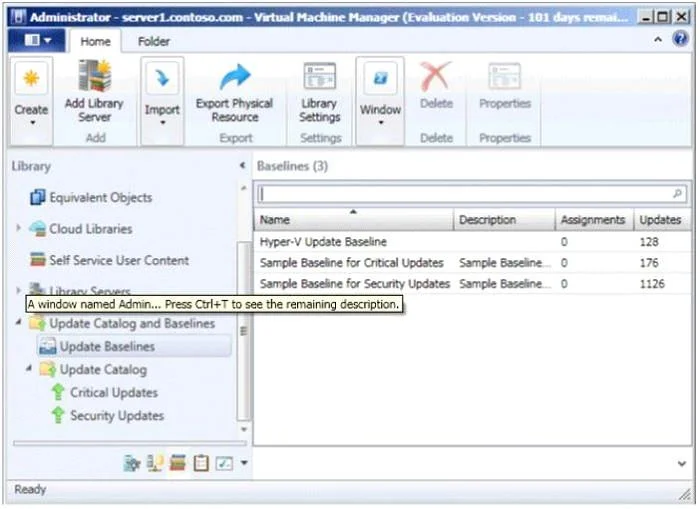
Options
- ACopy the required updates to the VMM library server.
- BModify the properties of HG1.
- CCopy the Virtual Machine template to an alternate location.
- DModify the properties of the baseline.
- ESynchronize the Windows Server Update Services (WSUS) server.
How the community answered
(24 responses)- A13% (3)
- B4% (1)
- D75% (18)
- E8% (2)
Explanation
You can see from the exhibit, the baseline the administrator created is not applied. To apply a baseline, you modify the properties of the baseline to select the hosts and groups. Source information: How to Configure Update Baselines in VMM Assign Computers to a Built-in Update Baseline VMM provides two sample built-in updates baselines that you can use to apply security updates and critical updates to the computers in your VMM environment. Before you can use a baseline, you must assign it to host groups, host clusters, or individual managed computers. The following procedure explains how to assign computers to the sample security baseline. To assign computers to a built-in update baseline 1. Open the Library workspace. 2. On the Library pane, expand Update Catalog and Baselines, and then click Update Baselines. The Baselines pane displays the two built-in baselines: Sample Baseline for Security Updates and Sample Baseline for Critical Updates. 3. On the Baselines pane, click Sample Baseline for Security Updates. 4. On the Home page, in the Properties group, click Properties. The Properties dialog box for the Sample Baseline for Security Updates opens. On the left of the dialog box, click Updates to open the Updates page. 5. On the Updates page, optionally add or remove update baselines from the baselines that are listed. The Sample Baseline for Security Updates includes all security updates. To ensure that all security updates are remediated, do not remove any baselines. 6. Click Assignment Scope to open the Assignment Scope page and then, select host groups, host clusters, and computers to add to the baseline. Computers are represented by the roles they perform in VMM. When you select a role, such as VMM server, all the roles that the computer performs in VMM are selected. For example, if your VMM management server is also a library server, selecting your VMM management server under VMM Server causes the same computer under Library Servers to be selected. To apply a baseline to all hosts, select the All Hosts root host group. 7. Click OK to save your changes.
Topics
Community Discussion
No community discussion yet for this question.