
70-246 · Question #151
Your company deploys System Center 2012 R2 Virtual Machine Manager (VMM). You plan to perform a new server deployment. The new server deployment will include a custom application named App1. You use…
The correct answer is A. A Script Application that adds the Server App-V Agent. App1 was not installed because the Server App-V Agent was missing from the VM; adding a Script Application that installs the Server App-V Agent to the application profile resolves this.
Question
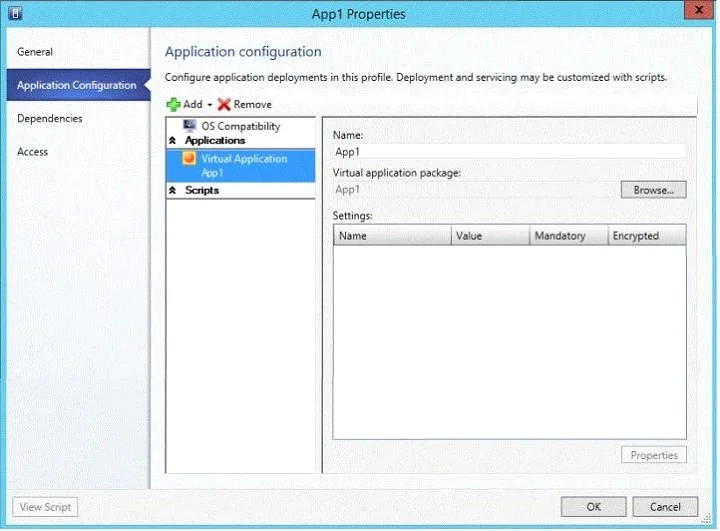
Your company deploys System Center 2012 R2 Virtual Machine Manager (VMM). You plan to perform a new server deployment. The new server deployment will include a custom application named App1. You use Server Application Virtualization (Server App-V) to virtualize App1. You create an application profile. You create a service deployment to deploy the App1 by using a Windows Server 2012 R2 template. After deploying the service, you discover that App1 was not installed. You view the application profile as shown in the exhibit. (Click the Exhibit button.) You need to ensure that App1 is installed when you deploy the service. What should you add to the application profile?
Exhibit
Options
- AA Script Application that adds the Server App-V Agent
- BA Script Application that adds the WebDeploy Agent
- CA Script to Application that installs the Server App-V Agent
- DA Script to Application that installs the WebDeploy Agent
How the community answered
(45 responses)- A80% (36)
- B7% (3)
- C2% (1)
- D11% (5)
Why each option
App1 was not installed because the Server App-V Agent was missing from the VM; adding a Script Application that installs the Server App-V Agent to the application profile resolves this.
Server App-V packages require the Server App-V Agent to be present on the target machine before a virtualized application can be deployed and run. In a VMM application profile, a Script Application is the correct object type used to run pre- or post-deployment scripts such as installing prerequisites. Adding a Script Application that installs the Server App-V Agent ensures the agent is present before App1's Server App-V package is applied during service deployment.
The WebDeploy Agent is used for deploying web applications via Web Deploy (MSDeploy) and has no role in Server App-V package execution or installation.
'Script to Application' is not a valid object type in VMM application profiles; the correct type is 'Script Application', making the phrasing in this option technically incorrect.
A Script to Application that installs the WebDeploy Agent addresses web deployment prerequisites and is irrelevant to the Server App-V virtualization pipeline used for App1.
Concept tested: VMM application profile Server App-V Agent prerequisite configuration
Source: https://learn.microsoft.com/en-us/system-center/vmm/app-profile?view=sc-vmm-2019
Topics
Community Discussion
No community discussion yet for this question.