
70-243 · Question #56
Note: This question is part of a series of questions that use the same set of answer choices. An answer choice may be correct for more than one question in the series. Your network contains a System…
The correct answer is G. Configure the Exchange connector on Server3. Determine How to Manage Mobile Devices in Configuration Manager Use the following information to help you decide how to manage mobile devices in System Center 2012 Configuration Manager. You can use Configuration Manager to enroll mobile devices and install the Configuration…
Question
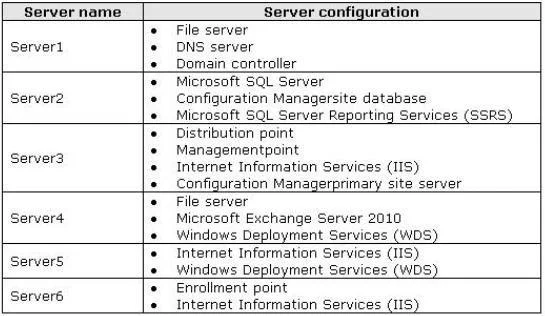
Note: This question is part of a series of questions that use the same set of answer choices. An answer choice may be correct for more than one question in the series. Your network contains a System Center 2012 Configuration Manager environment as shown in the exhibit. (Click the Exhibit button.) The network contains six servers. The servers are configured as shown in the following table. You need to ensure that mobile device information is available in the hardware inventory. What should you do?
Exhibit
Options
- AInstall a management point on Server5.
- BConfigure IIS to support only HTTPS on Server5.
- CInstall a management point on Server2.
- DInstall Network Load Balancing (NLB) on Server3.
- EInstall an enrollment proxy point on Server6.
- FConfigure IIS to support only HTTP on Server3.
- GConfigure the Exchange connector on Server3.
- HInstall Network Load Balancing (NLB) on Server6.
- IInstall a PXE-enabled protected distribution point on Server5.
- JInstall the Windows Cluster service on Server3.
How the community answered
(31 responses)- A6% (2)
- B3% (1)
- E3% (1)
- G87% (27)
Explanation
Determine How to Manage Mobile Devices in Configuration Manager Use the following information to help you decide how to manage mobile devices in System Center 2012 Configuration Manager. You can use Configuration Manager to enroll mobile devices and install the Configuration Manager client, you can use the mobile device legacy client (for example, for Windows CE mobile operating systems), and you can use the Exchange Server connector. In addition, in Configuration Manager SP1, you can enroll devices that run Windows Phone 8, Windows RT, and iOS by using the Windows Intune connector. The following table lists these four mobile device management methods and provides information about the management functions that each method supports: Determine the Site System Roles for Client Deployment in Configuration Manager - Determine Whether You Require an Enrollment Point and an Enrollment Proxy Point Configuration Manager requires the enrollment point and the enrollment proxy point to enroll mobile devices and to enroll certificates for Mac computers (Configuration Manager SP1 only). These site system roles are not required if you will manage mobile devices by using the Exchange Server connector, or if you install the mobile device legacy client (for example, for Windows CE), or if you request and install the client certificate on Mac computers independently from Configuration Manager.
Topics
Community Discussion
No community discussion yet for this question.