
70-243 · Question #46
Note: This question is part of a series of questions that use the same set of answer choices. An answer choice may be correct for more than one question in the series. Your network contains a System…
No correct answer was provided for this question; the first step to centrally manage software updates in a ConfigMgr environment is to ensure a management point exists at the relevant site so clients can receive deployment policies.
Question
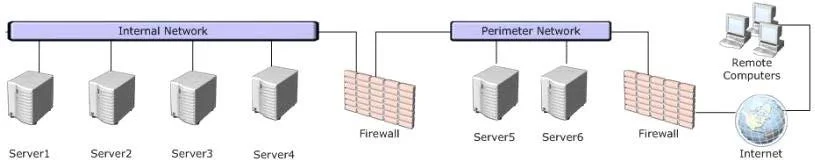
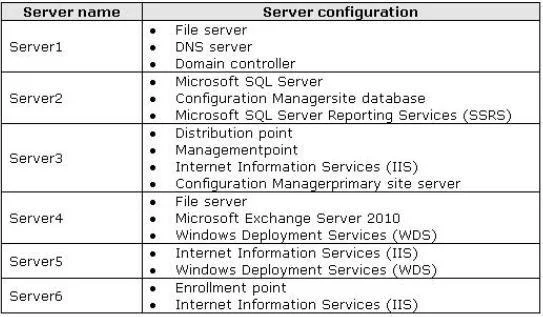
Note: This question is part of a series of questions that use the same set of answer choices. An answer choice may be correct for more than one question in the series. Your network contains a System Center 2012 Configuration Manager environment as shown in the exhibit. (Click the Exhibit button.) The network contains six servers. The servers are configured as shown in the following table. Administrators currently apply software updates to servers manually. You discover that Server4 was never updated. You need to centrally manage software updates for all of the servers by using configuration Manager. What should you do first?
Exhibits
Options
- AInstall a management point on Server5.
- BConfigure IIS to support only HTTPS on Servers.
- CInstall a management point on Server2.
- DInstall Network Load Balancing (NLB) on Server3.
- EInstall an enrollment proxy point on Server6.
- FConfigure IIS to support only HTTP on Server3.
- GConfigure the Exchange connector on Server3.
- HInstall Network Load Balancing (NLB) on Server6.
- IInstall a PXE-enabled protected distribution point on Servers.
- JInstall the Windows Cluster service on Server3.
Why each option
No correct answer was provided for this question; the first step to centrally manage software updates in a ConfigMgr environment is to ensure a management point exists at the relevant site so clients can receive deployment policies.
Configuring IIS to support only HTTPS is a security hardening step for site system communication, not a prerequisite for enabling centralized software update management.
If Server2 already has a management point role or does not serve the clients that include Server4, installing one there would not resolve the management gap.
Network Load Balancing on Server3 provides high availability for site services but is not a requirement to begin centrally managing software updates.
An enrollment proxy point is used for enrolling mobile devices into management and has no role in managing software updates on servers.
Configuring IIS for HTTP on Server3 changes a protocol setting for that server's site system role but does not enable software update management for the environment.
The Exchange connector manages mobile devices via Exchange ActiveSync and is unrelated to server software update management.
Network Load Balancing on Server6 is a high-availability configuration and is not a prerequisite for enabling centralized software update management.
A PXE-enabled distribution point is used for operating system deployment via PXE boot, not for deploying software updates.
Windows Cluster service provides failover clustering for high availability and is not required to enable software update management in ConfigMgr.
Concept tested: SCCM management point prerequisite for update management
Source: https://learn.microsoft.com/en-us/mem/configmgr/core/plan-design/hierarchy/plan-for-site-system-roles
Topics
Community Discussion
No community discussion yet for this question.